How much does IT support cost for an insurance agency in Dallas?
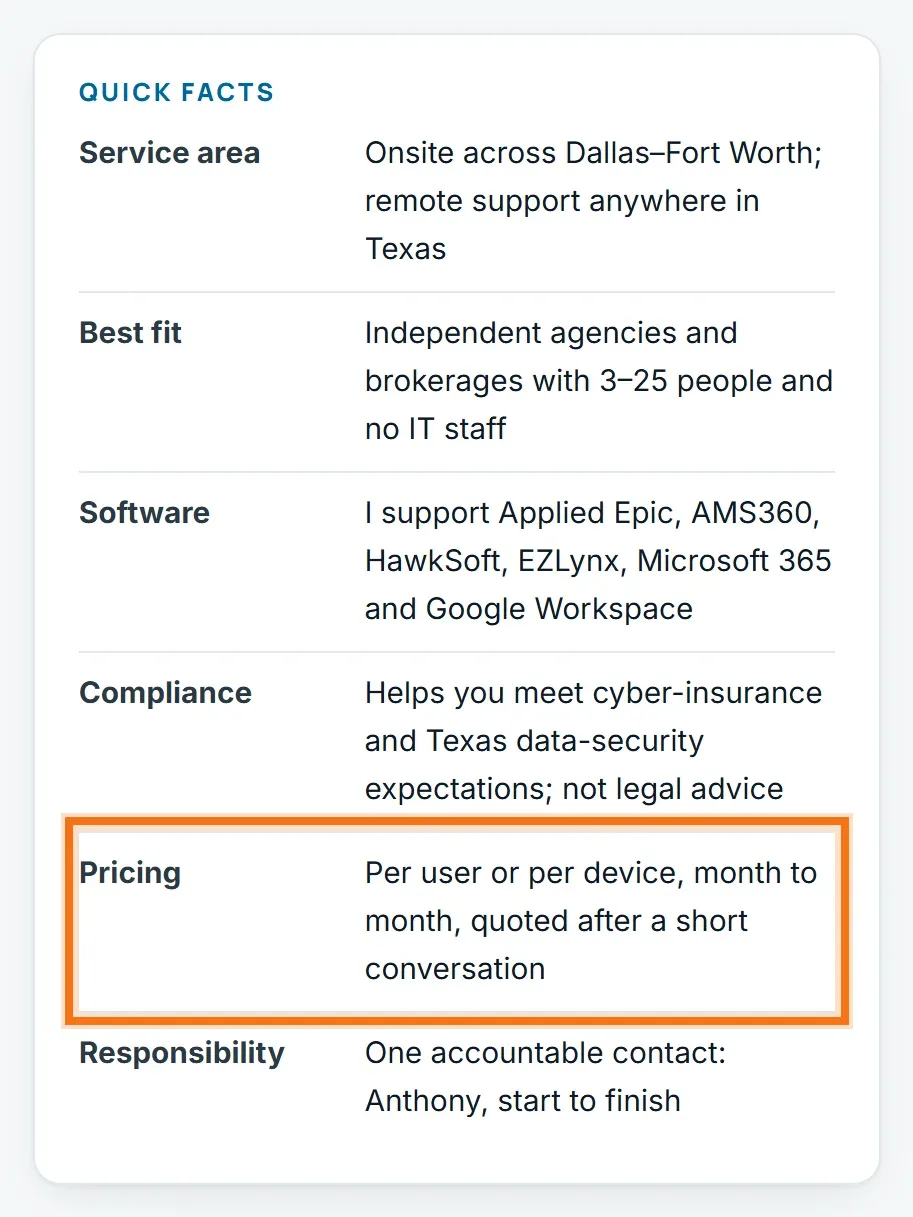
Managed IT for a Dallas insurance agency is quoted per user or per device per month. Across the Dallas market that is commonly around $100 to $175 per user, a typical range rather than my price list, so a 10-person agency would see roughly $1,000 to $1,750. I am Anthony Omini of Cross River Tech: I quote each agency after a short conversation, month to month, and hourly help is $100 remote or $150 onsite.
Answered by Anthony Omini, Cross River Tech, Dallas

Key takeaways
- Most IT companies quote an insurance agency per user or per device per month; in the Dallas market that is commonly around $100 to $175 per user, a typical range and not my price list.
- At that range a 5-person agency sees roughly $500 to $875 a month for support, a 10-person agency $1,000 to $1,750 and a 20-person agency $2,000 to $3,500.
- The agency management system, comparative rater, e-signature, Microsoft 365 licenses, phones and hardware are separate bills with any IT company.
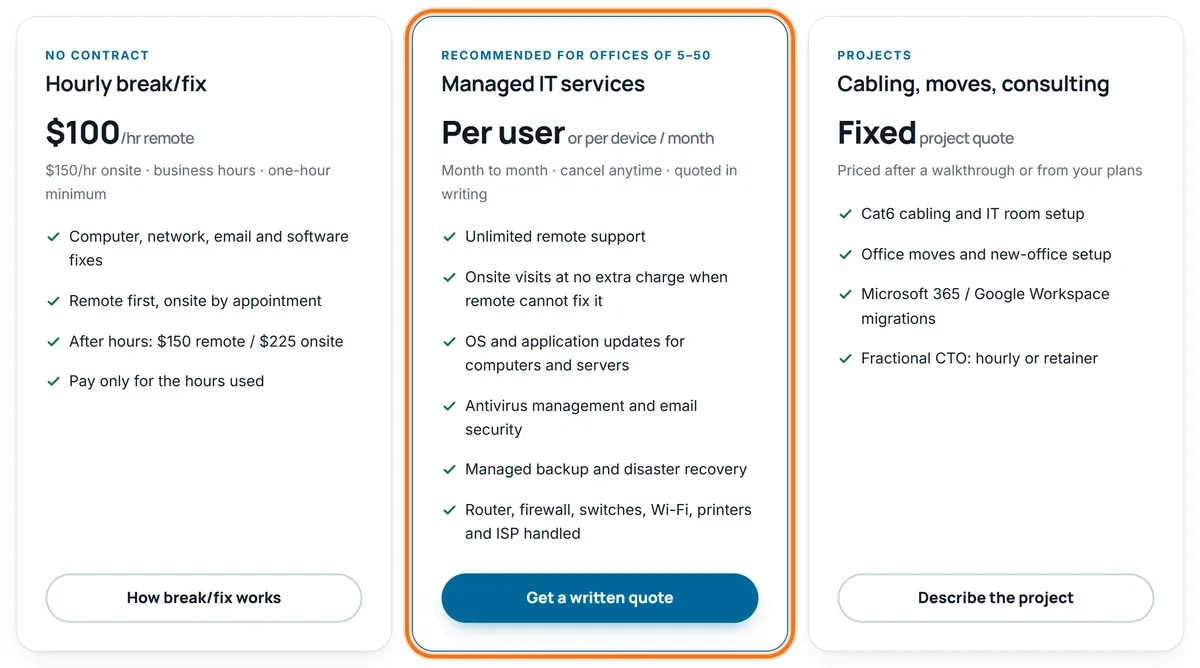
- Hourly help with no contract costs $100 per hour remote and $150 onsite during business hours, and suits a very small, stable agency better than one with producers on the road.
- A cheap quote usually leaves out the items your cyber-insurance questionnaire asks about: multi-factor sign-in everywhere, tested backups, email security and same-day offboarding.
What does IT support cost for an insurance agency in Dallas?
On a monthly plan, a Dallas insurance agency pays a price per user or per device. Across the Dallas market, small business managed IT is commonly quoted somewhere around $100 to $175 per user per month. That is a typical market range, not my price list. Hourly help with no contract is the other way to buy it: my published rates are $100 per hour remote and $150 per hour onsite during business hours.
I am Anthony Omini, the owner of Cross River Tech in Dallas, and independent agencies and brokerages are one of the industries I know best. I quote each agency after a short conversation, because two eight-person agencies can be very different jobs. One runs a cloud-hosted management system, Microsoft 365 and a cloud phone system, with everyone in the office. The other has an older install on a server in a closet, three producers working from their cars and a shared login to half the carrier portals.
To make the market range concrete, here is the arithmetic at three agency sizes. These are sums on the typical range, not quotes from me:
| People in the agency | Monthly support at the typical Dallas market range | Yearly |
|---|---|---|
| 5 people (owner, two producers, two CSRs) | About $500 to $875 | About $6,000 to $10,500 |
| 10 people | About $1,000 to $1,750 | About $12,000 to $21,000 |
| 20 people | About $2,000 to $3,500 | About $24,000 to $42,000 |
How to read this table: the support figure grows in a straight line with the count, so settle the count first. It is the support fee only. The agency management system, licenses, phones and hardware come on top and are covered further down. For how the wider market prices this kind of work, see what managed IT services cost in Dallas. How I support agencies day to day is on the IT support for insurance agencies page.
Per user or per device: how is an agency counted?
In most agencies the two methods land close together, with one exception: producers. A CSR has one desktop with two monitors. A producer often has a laptop, a phone with the agency mailbox on it, sometimes a tablet, and a desktop at the office they use twice a week. Under per-device pricing that producer can count three or four times. Under per-user pricing they count once.
- A per-user quote counts the people who sign in: the owner, producers, account managers, CSRs and the bookkeeper. Every device those people use is covered because the person is covered. For an agency with producers on the road, this is usually the simpler way to count.
- A per-device quote counts computers, and sometimes phones and tablets. It can cost less when several part-time CSRs share a few desks, and more when every producer carries three devices.
Before you compare numbers, ask each provider four things: what exactly is counted, whether phones and tablets count as devices, whether a server in the office is priced separately, and how a part-time or seasonal employee is treated. I price either way and tell you which one comes out lower for your agency. The general comparison is in per-user vs per-device IT pricing.
What should the monthly fee include for an insurance agency?
A monthly fee is only worth comparing when the quotes cover the same work. What I include in managed IT for an insurance agency:
- Unlimited remote support for producers, CSRs and account managers, in the office or on the road, and onsite visits at no extra charge when remote cannot fix it
- Support for Applied Epic, AMS360, HawkSoft and EZLynx at the IT level: the computers, browsers, the Outlook connection, scanning into the system and the network, working alongside the vendor when the problem is inside their product
- Carrier portals and comparative raters set up so they work in the right browser with the right settings, and stay working after updates
- Microsoft 365 or Google Workspace administration, including e-signature and the shared mailboxes CSRs work from
- Multi-factor sign-in and a password manager for email, the management system and carrier portals
- Managed backup of email, shared files and any server in the office, encrypted, kept offsite, with restore tests
- Antivirus and endpoint protection on every computer, including producers' laptops at home
- Email filtering, spoofing checks and encryption for policy and payment information
- Windows and application updates scheduled outside business hours
- Same-day offboarding when someone leaves, including carrier portal and rater access
- The firewall, switches, Wi-Fi, printers and the internet provider, managed and monitored
Whether the management system is cloud-hosted or runs on a server in the office changes the work. A hosted system puts the platform on the vendor, but the connection, the browsers, the Outlook add-in and everything the agency saves outside it stay with the IT company. An office server adds patching, backup and a replacement date. IT support for Applied Epic, AMS360 and agency management systems shows where the line between the vendor and the IT company really sits.
What is billed on top of the monthly IT fee?
Several things are almost always separate bills, with any IT company. A fair quote lists them so the monthly number is not a surprise later.
| Bill | Who you pay | How it is usually priced |
|---|---|---|
| Agency management system (Applied Epic, AMS360, HawkSoft, EZLynx and others) | The software vendor | A subscription set by the vendor, often per user, plus any hosting or add-on fees |
| Comparative rater and other quoting tools | The rater vendor | Subscription, set by the vendor |
| E-signature | The e-signature provider | Per user or per envelope, monthly or yearly |
| Microsoft 365 or Google Workspace | Microsoft or Google, directly or through the IT company | Per user, per month, at the vendor's price |
| Phones | The phone provider | Per line or per user, monthly |
| Laptops, desktops, monitors, firewall, Wi-Fi | The hardware supplier | Per item, when bought or replaced |
| Projects: a second office, a migration, cabling | The IT company | A fixed project quote |
How to read this table: the IT support fee is one line of seven. Ask each vendor for its current price, because these change and each vendor sets its own; I do not quote other companies' prices for them. Add the software subscriptions and a yearly amount for replacing a few computers to the support figure, and you have the real monthly cost of running the agency's technology.
Carrier portals themselves usually cost the agency nothing, but they cost time. A dozen portals with a dozen password rules is a support load, and a well-run setup with individual logins and a password manager is part of what the monthly fee should pay for. A new office is a project, not a monthly line; IT for an insurance agency opening a second location covers what goes into that quote.
What makes an agency's IT quote higher or lower?
Six things move the number most:
- People and devices. The largest factor. Producers with a laptop, a phone and a tablet add more than CSRs at a desk if the quote is per device.
- Cloud or server. A cloud-hosted management system moves platform work to the vendor. An older install on an office server means that server is patched, backed up and eventually replaced, and it is the most important machine in the building.
- Producers on the road. Remote access with multi-factor sign-in, encrypted laptops and phones that can be wiped if lost take setup and ongoing care. Done casually, they are the gap a cyber underwriter finds first.
- Where client data lives. Applications, driver's license scans and bank details spread across inboxes, desktops and a shared drive take more work to protect and back up than data kept inside the management system. Better backups for insurance agencies lists what the vendor's backup does not cover.
- What the security questionnaire needs that is not in place yet. Multi-factor sign-in, endpoint protection, email filtering and tested backups take more work at the start if the agency has run on shared passwords for years.
- Locations. A second office adds a second network, a link between the two and a second set of printers and phones.
None of these is a reason to pay more than you should. They are the questions a careful provider asks before giving a number. A quote that arrives without anyone asking which management system you run, or whether producers work from home, is a guess. If you want a number built on your real setup, tell me about your agency and I will come back with one.
Where does the cyber-insurance questionnaire fit in the IT budget?
For an agency, the security budget is mostly written by the questionnaire your own cyber carrier sends at renewal. It asks about multi-factor sign-in on email, remote access and admin accounts, endpoint protection, backups that ransomware cannot reach, email filtering, staff training, patching and removing access when people leave. Each item is either a one-time setup, an ongoing monthly task, or both:
| Questionnaire item | One-time or ongoing | Where the cost usually sits |
|---|---|---|
| Multi-factor sign-in on email, remote access and admin accounts | Mostly one-time setup, then kept in place | Setup in the first weeks; upkeep in the monthly fee |
| Endpoint protection on every computer | Ongoing | The monthly fee |
| Offsite backups that cannot be altered, with restore tests | Ongoing | The monthly fee, plus storage if data is large |
| Email filtering and anti-phishing | Ongoing | The monthly fee, sometimes a license tier per user |
| Security awareness training and simulated phishing | Ongoing | The monthly fee or a separate per-user tool |
| Patching and updates | Ongoing | The monthly fee |
| Same-day access removal when someone leaves | Ongoing | The monthly fee |
How to read this table: almost every item lands in the monthly fee once it is set up. That is why a cheap quote that skips them is not cheaper; it moves the cost to the renewal, when the honest answer to a question is "no". If you have already had a form come back with gaps, what to do after a failed cyber-insurance questionnaire walks through the fix in order.
The rules behind the questionnaire matter too. Texas law requires a business whose breach affects 250 or more Texans to report it to the Texas Attorney General no later than 30 days after discovering it, and insurance regulators increasingly expect agencies to have a written information security program suited to their size. Which rules apply to your agency is a question for your attorney or compliance consultant. The technical safeguards and the documentation are my part, explained in insurance agency cybersecurity and compliance in Texas.
Is hourly IT support cheaper for a small insurance agency?
For a very small, stable agency, sometimes yes. If the office has three or four people at desks, newer computers, a cloud-hosted management system and a problem a few times a year, paying by the hour can cost less than a monthly plan. My hourly break/fix rates are published, with a one-hour minimum, billed by the hour:
| A typical agency call | Rate that applies | What it costs |
|---|---|---|
| A carrier portal stopped loading after a browser update, fixed remotely in under an hour on a weekday | $100 per hour remote, business hours | $100 |
| New producer laptop set up with email, the management system and multi-factor sign-in, two hours remote | $100 per hour remote, business hours | $200 |
| Office printer and scanner stopped filing into the management system, two hours onsite on a weekday | $150 per hour onsite, business hours | $300 |
| Mailbox compromised on a Saturday, three hours remote to lock it down and check the rules | $150 per hour remote, after hours | $450 |
How to read this table: the right column is the rate multiplied by the hours, nothing else. Business hours are Monday to Friday, 8 AM to 5 PM Central; evenings, weekends and holidays are after hours, $150 remote and $225 onsite. The examples illustrate the arithmetic, not a promise of how long any repair takes.
Hourly stops being the cheaper choice when nobody is applying updates or checking backups between calls, when producers work remotely, or when the cyber questionnaire asks who manages security and the honest answer is "nobody, until something breaks". Hourly vs monthly IT support works through the break-even point. All three ways to buy, with what each includes, are on the pricing page.
What does it cost an insurance agency to get IT wrong?
More than the monthly fee, and the costs are easy to name without inventing statistics:
- Lost quotes. When the management system freezes while a producer is on the phone with a prospect, the quote goes out late or not at all. During renewal season that adds up fast.
- Payment redirection. A hacked or spoofed mailbox sends a client or a carrier new payment instructions. Money moves, and it does not come back.
- A lost laptop. An unencrypted producer laptop taken from a car is a list of Social Security numbers and driver's license numbers, and possibly a notification duty.
- A departed producer with access. Shared carrier portal logins that were never changed, or a mailbox nobody disabled, leave client data in the hands of someone who now works for a competitor.
- A contested claim. If the cyber application said multi-factor sign-in was in place and it was not, the claim can be questioned on the day it matters most.
- Emergency rates. Whoever can come fastest on a bad morning charges after-hours prices and has never seen the agency's setup before.
Almost all of it is prevented by routine work: multi-factor sign-in on every account, email filtering, encrypted laptops, backups that someone restores on purpose and an offboarding checklist that includes the carrier portals. That routine is what a monthly fee pays for.
How do I compare IT quotes for an insurance agency?
Ask every provider the same questions, in writing, and line the answers up:
| Ask | Why it matters in an agency |
|---|---|
| Is the price per user or per device, and do producers' phones and tablets count? | Producers carry several devices, so the counting method can change the total |
| Do you support my agency management system and carrier portals, or only the computers? | Portal and Outlook add-in problems are where a general IT company loses days |
| Is multi-factor sign-in on email, remote access and admin accounts included? | It is the first question on every cyber-insurance questionnaire |
| What is backed up besides the vendor's platform, and when was a restore last tested? | The vendor backs up its system, not your email, scans and shared files |
| Are onsite visits included? | A dead scanner or a network problem cannot always be fixed over the phone |
| Who removes a departed producer's portal access, and how fast? | Shared logins are how client data leaves with people |
| How long is the contract, and what does leaving cost? | Month to month keeps the provider earning the work |
| Who will I actually talk to? | The agency owner should not explain the setup to a new person on every call |
What this means for you: two quotes with the same monthly number can cover very different work. The cheap one usually drops onsite visits, backup testing, portal support or the security items, and those eight answers show it. How to compare IT support quotes has a fuller checklist for any small business.
Why Dallas agencies choose Cross River Tech, and how to get a number
Cross River Tech is a small, owner-led IT company in Dallas, and you deal with me directly. I answer, plan the work and come onsite myself, while my team handles the routine monitoring and updates behind me. I support Applied Epic, AMS360, HawkSoft and EZLynx, the carrier portals producers use every day, and Microsoft 365 or Google Workspace. The agreement is month to month and you can cancel anytime. I put the safeguards in place that help an agency meet cyber-insurance and Texas data-security expectations, and I say plainly that legal questions stay with your attorney.
I am also honest about fit. An independent agency or brokerage from a few people up to about 25, with no IT person of its own, is where I do my best work. A large brokerage with many offices and its own IT department needs a different kind of provider, and I will say so.
To get a real number, tell me four things: how many people and devices you have, which management system you run and whether it is hosted or on a server, how many producers work outside the office, and what has been breaking. If you have your last cyber-insurance questionnaire, send that too. I come back with a monthly figure, the list of what I would fix first, and what is billed separately. I work onsite across Dallas–Fort Worth by appointment and remotely anywhere in Texas. Book a call or ask for a quote, or call (214) 612-7080.
Questions people ask
How much does IT support cost for an insurance agency in Dallas?
Most IT companies quote an insurance agency per user or per device per month. Across the Dallas market, small business managed IT is commonly around $100 to $175 per user per month, a typical range rather than any one company's price. The management system, licenses, phones and hardware are billed separately. Cross River Tech quotes each agency after a short conversation, month to month.
What should an insurance agency budget for IT each month?
Start with the support fee: at the typical Dallas market range of about $100 to $175 per user, a 10-person agency would see roughly $1,000 to $1,750 a month. Then add the agency management system subscription, the rater and e-signature tools, Microsoft 365 or Google Workspace licenses, the phone bill and a yearly amount for replacing a few computers.
Is the agency management system included in IT support?
No. Applied Epic, AMS360, HawkSoft, EZLynx and similar systems are paid to the software vendor. IT support covers what the vendor does not: the computers, browsers, the Outlook connection, scanning, the network, backups of everything outside the platform and secure remote access. Cross River Tech also works with the vendor on the agency's behalf when the problem is inside their product.
Is per-user or per-device pricing better for an insurance agency?
Per user is usually simpler for agencies with producers on the road, because one producer may carry a laptop, a phone and a tablet and would count several times per device. Per device can cost less when several part-time staff share a few desks. Ask each provider exactly what is counted, including phones and any office server, before comparing totals.
Can a small agency use hourly IT support instead of a monthly plan?
Yes. Cross River Tech offers hourly help with no contract: $100 per hour remote and $150 onsite during business hours, $150 remote and $225 onsite after hours, with a one-hour minimum. It suits a very small, stable agency. Once producers work remotely and the cyber questionnaire asks who manages security every month, a managed plan usually costs less than the problems it prevents.
Does the IT fee cover what the cyber-insurance questionnaire asks for?
On a managed plan, most of it. Multi-factor sign-in, endpoint protection, email filtering, patching, tested offsite backups and same-day offboarding are set up at the start and kept in place as part of the monthly service, and I document each one so you can answer the form honestly. Legal questions about which rules apply stay with your attorney.
Are onsite visits extra on a monthly plan?
Not with Cross River Tech. On a managed plan, onsite visits come at no extra charge when remote support cannot fix the problem. Agencies on hourly help pay the onsite rate, $150 an hour during business hours and $225 after hours, with a one-hour minimum. When comparing quotes, check whether another provider's plan is remote only.
What does a cheap IT quote for an agency usually leave out?
Usually one of five things: onsite visits, backups of email and files outside the management system, restore testing, carrier portal and add-in support, or the security items a cyber questionnaire asks about. Each one looks optional until the day it is needed. Ask every provider in writing whether these are included before you compare the monthly numbers.
Sources and further reading
Market price ranges in this article are my own observation of quotes in the Dallas market, not a published survey. Where I state a rule or a standard, the source is linked above.