How much does cybersecurity cost for a 20-person company in Dallas?
For a 20-person Dallas office, cybersecurity cost comes in four layers. The basic controls Microsoft offers (multi-factor authentication through security defaults) cost nothing but setup time. Moving 20 people from Microsoft 365 Business Standard ($14.00) to Business Premium ($22.00, both per user per month, paid yearly) adds $160 a month in licenses. Running it every month is usually part of managed IT, which the Dallas market commonly quotes around $100 to $175 per user per month for everything, not just security. Cyber insurance and audits are separate.
Answered by Anthony Omini, Cross River Tech, Dallas

Key takeaways
- The controls that stop the most common attacks, multi-factor authentication and blocking old sign-in methods, are free in Microsoft 365. You pay only for the time to set them up properly.
- The license step is real but small: Business Premium is $8 more per user per month than Business Standard on Microsoft's own page, so $160 a month for 20 people on a yearly plan.
- Most of the cost is the people work: patching, watching alerts, testing backups and fixing what breaks. With me that is part of managed IT, not a separate security bill.
- Cyber insurance premiums, formal audits and replacing computers that are too old to secure are separate costs. Know them before you compare quotes.
- If a quote sells you tools before anyone has looked at what you already have, ask for the review first.
How much does cybersecurity cost for a 20-person company in Dallas?
There is no single number, because cybersecurity for a 20-person office is four different costs stacked on top of each other: the free controls that come with the software you already pay for, the license tier that unlocks better device and email protection, the monthly work of running all of it, and the outside costs like cyber insurance. When an owner asks me what security costs, I break it into those four, because that is the only way to compare two quotes honestly.
Here is the short version for a typical Dallas office of 20 people on Microsoft 365:
- Free, apart from setup time: multi-factor authentication and blocking old sign-in methods, using Microsoft's security defaults or equivalent settings.
- About $160 a month in licenses: the difference between 20 users on Business Standard ($14.00 each) and Business Premium ($22.00 each), per user per month on Microsoft's yearly price.
- The monthly work: patching, endpoint protection, email security, backup and restore tests. With me this is included in managed IT, quoted per user or per device. For reference only, small business managed IT in the Dallas market is commonly quoted somewhere around $100 to $175 per user per month for all IT support, not just security. That is a typical market range, not my price.
- Separate: cyber insurance premiums, formal compliance audits and replacing computers too old to secure.
I am Anthony Omini, owner of Cross River Tech in Dallas, and I run cybersecurity, backup and disaster recovery for small offices across Dallas-Fort Worth. The rest of this page goes layer by layer, with the vendor prices I can show you on the vendor's own site, so you can check every number.
What does a 20-person office actually need to protect?
Before any price makes sense, it helps to know what the money is protecting. A 20-person office in Dallas, whether it is a law firm in Uptown, a dental group in North Dallas or an insurance agency in Plano, has the same five things an attacker goes after:
- Accounts. Twenty email logins, plus the admin account that controls all of them. A stolen or guessed password is one of the most common ways in, which is why sign-in protection comes first.
- Email. Phishing links, fake invoices and attachments. Email is also how a criminal who got into one mailbox tricks your clients into paying a fake account.
- Computers and servers. Twenty or more laptops and desktops, each one a way in if it misses updates or runs without endpoint protection.
- Data and backups. Client files, patient or policyholder records, accounting. Ransomware goes after these, and after the backups too if it can reach them.
- People. The best settings in the world still depend on someone who stops before clicking and tells you when they did click.
At 20 people there is too much here for anyone to track on the side, but most offices this size still have nobody whose job is IT. That gap, not a lack of expensive tools, is where most of the risk sits. My page on cybersecurity basics for a Dallas small business explains each of these in plain English if you want the background first.
Layer 1: the controls that cost nothing but setup time
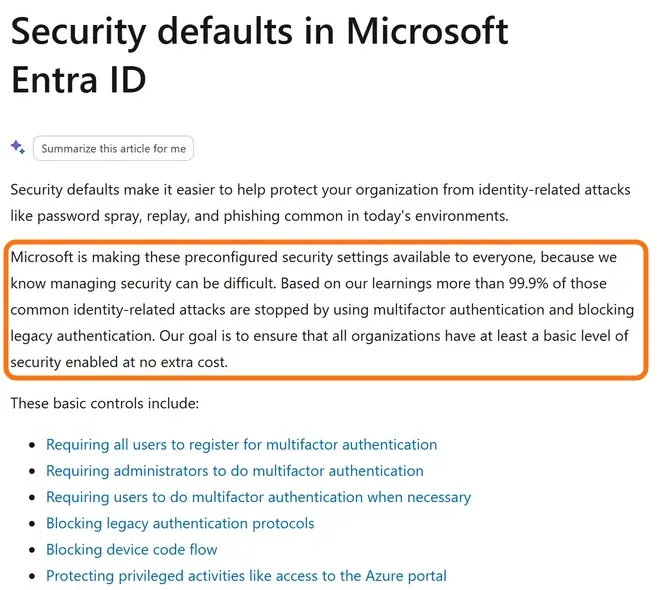
The good news first. The two controls that stop the largest share of common attacks on a small office are already in the Microsoft 365 subscription you pay for. Microsoft calls the package security defaults, and its own documentation says the goal is for every organization to have a basic level of security "at no extra cost." The settings:
- Every user registers for multi-factor authentication (a code or app prompt on the phone, on top of the password).
- Administrators must use multi-factor authentication every time.
- Legacy authentication, the old sign-in methods that skip multi-factor completely, is blocked.
Microsoft states that, based on its own data, more than 99.9% of common identity-related attacks are stopped by multi-factor authentication and blocking legacy authentication. That is Microsoft's figure, not mine, and it is the reason this is always the first thing I do in a new office.
So why is it not free in practice? Because switching it on is the easy part. The cost is the setup work around it: checking which older devices, scanners and apps still use the old sign-in methods before they get blocked, walking 20 people through registering their phones, setting up the shared mailboxes and the copier that sends scans by email, and making sure there is a tested way back in if the owner's phone is lost. Done in a rush on a Monday morning, it locks people out. Done in a planned afternoon, nobody notices.
For an office without a monthly agreement, that work is billed at my published hourly rates: $100 per hour remote and $150 per hour onsite during business hours, Monday to Friday 8 AM to 5 PM Central, one-hour minimum. For managed clients it is part of onboarding. How many hours it takes depends on what the office already has, which is why I look first and quote second.
Layer 2: the license step from Business Standard to Business Premium
The second layer is the Microsoft 365 plan itself. Most 20-person offices I see run Business Standard, which gives everyone the desktop Office apps, email and cloud storage. Business Premium adds the security and device management a growing office needs. Microsoft's own documentation states that Business Premium includes Microsoft Defender for Business, an endpoint security product built for businesses up to 300 users, with protection against ransomware, malware and phishing on devices. Premium also brings the device management and the access rules (Conditional Access) that let you decide, for example, that nobody signs in from a personal laptop that is not up to date.
On Microsoft's plan pages in November 2026:
- Business Standard: $14.00 per user per month, paid yearly, or $16.80 on a monthly subscription.
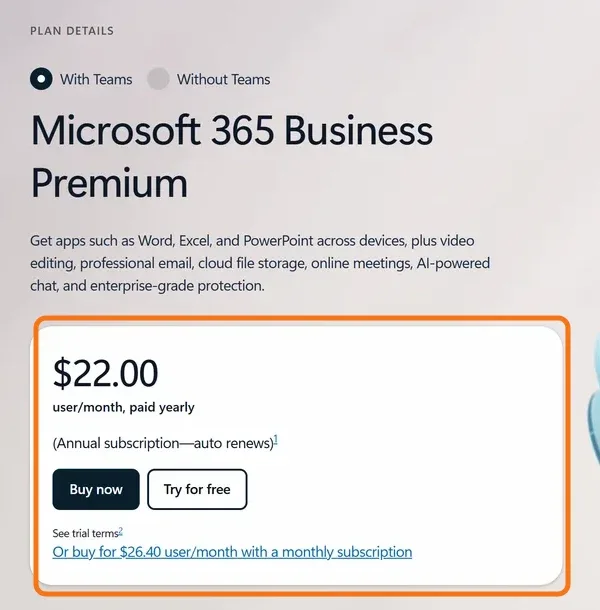
- Business Premium: $22.00 per user per month, paid yearly, or $26.40 on a monthly subscription.
For 20 people on the yearly price, that is $280 a month for Standard and $440 a month for Premium. The security step costs $160 a month, or $1,920 a year. On monthly billing the gap is $9.60 per user, or $192 a month for 20 people.
Is it worth it? For an office handling client money, patient records or policyholder data, usually yes, because Premium replaces things you would otherwise buy and manage separately: a third-party antivirus subscription, a separate device management tool, sometimes a separate email filtering product. For a very small, low-risk office, Standard with security defaults and a good managed antivirus can be enough. I recommend the tier after seeing the office, and I pass licenses through at the published price. If you are still choosing between Microsoft and Google, my comparison of Google Workspace and Microsoft 365 for a Dallas small business covers the plans side by side.
Layer 3: the monthly work, and why it is most of the cost
Tools do not protect an office. Someone has to run them. The monthly work is where most of the money goes, and where cheap quotes usually cut corners. For a 20-person office it means:
- Patching Windows, Mac and every application on a schedule, with reboots planned around your day, and chasing the two laptops that never seem to restart.
- Keeping endpoint protection current on every computer and server, and acting on what it reports.
- Email security: spam and phishing filtering, link and attachment checking, and the SPF, DKIM and DMARC records on your domain that stop criminals from sending email as you.
- Backups of servers, computers and Microsoft 365 or Google Workspace, kept both local and offsite, with scheduled restore tests and a note to you each time saying what was restored and how long it took.
- Removing access the day someone leaves, and setting up new hires correctly the day they start.
- A written disaster recovery plan that says what happens if the server dies, ransomware hits or the office is unusable.
With me, all of that is included in managed IT, quoted per user or per device after a short conversation and billed month-to-month, cancel anytime. There is no separate security line on the invoice. For context, small business managed IT in the Dallas market is commonly quoted somewhere around $100 to $175 per user per month. For 20 users that range works out to about $2,000 to $3,500 a month, and it covers all IT support, not only security. That is a typical market range, not my figure. My guide to what managed IT services cost in Dallas explains what moves a quote up or down.
Cybersecurity cost for a 20-person Dallas office, line by line
Here are all four layers in one place, with where each number comes from.
What each layer costs a 20-person office
| Layer | What you get | Cost for 20 people | Where the number comes from |
|---|---|---|---|
| Security defaults | Multi-factor authentication for everyone, old sign-in methods blocked | No license cost; setup time only | Microsoft Entra documentation |
| Business Standard licenses | Office apps, email, cloud storage | $280 a month (20 × $14.00, paid yearly) | microsoft.com plan page |
| Business Premium licenses | Standard plus Defender for Business, device management, Conditional Access | $440 a month (20 × $22.00, paid yearly), $160 more than Standard | microsoft.com plan page |
| Managed IT with security included | Patching, endpoint protection, email security, tested backups, recovery plan, support | Quoted per user or per device; Dallas market commonly around $2,000 to $3,500 a month for 20 users | Typical market range, not my price |
| Hourly help instead | Setup and fixes billed as used, no contract | $100/hr remote, $150/hr onsite; after hours $150 and $225 | My published rates |
| One-time security and backup review | A look at what you have and a list of what to fix first | Quoted as a fixed project or at the hourly rates | My cybersecurity service page |
| Cyber insurance, audits | Coverage after an incident; formal assessments | Set by the insurer or auditor | Not an IT company cost |
How to read this table: the first three rows are software, and their prices are the same for everyone because they come from Microsoft's price list. The managed IT row is where providers differ, and it is the row to compare carefully, because a low monthly number that leaves out backups, restore tests or after-hours help is not cheaper once something goes wrong. The last row is real money, but it is not something your IT provider should be selling you.
What costs extra, and what you should not pay extra for
Three costs sit outside your IT provider's quote, and it helps to plan for them:
- Cyber insurance. The premium is set by the insurer. What I can do is make sure the answers on the questionnaire are true: multi-factor authentication on email and remote access, endpoint protection, tested backups. A wrong answer can cost you the claim. If you have already been turned down, read what to fix first after a failed cyber insurance questionnaire.
- Audits and formal assessments. A dental or medical practice needs a HIPAA risk analysis; some clients and lenders ask for security questionnaires. I document the technical safeguards truthfully, but I am not an auditor, and no product or provider can make you "HIPAA compliant" with a purchase.
- Old computers. A machine that can no longer get security updates cannot be made safe with software. Windows 10 reached the end of free support in October 2025, so offices still on it have a replacement or extended-update cost to plan. My guide on office computers still on Windows 10 covers the options.
And a few things you should not pay a separate fee for, if you already pay for managed IT: basic multi-factor setup, patching, antivirus management, email filtering, backup monitoring and restore tests. Those are the job. Be careful too with any quote that leads with a bundle of security products before anyone has looked at your office. The right order is a look at what you have, then a list of gaps, then a price.
Hourly or managed: which is cheaper for 20 people?
Some offices try to save money by doing security as one-off projects: hire someone to switch on multi-factor authentication and set up a backup, then call only when something breaks. It works for a while. The problem is that security is mostly maintenance. Patches come every month, people join and leave, backups fail quietly, and nobody is paid to notice.
At 20 people the math usually favors a monthly agreement, because the routine work by itself adds up to more than a few hours a month, and every hour of it billed hourly costs $100 remote or $150 onsite during business hours, $150 or $225 after hours. A monthly fee also changes the incentive: the provider is paid to prevent problems, not to fix them. That said, I offer both, and some offices start hourly with a one-time review and switch later. My article on hourly vs monthly IT support in Dallas walks through a sample month both ways.
If you are around 20 people and growing, my guide on what IT support a 25-person office in Dallas needs shows what changes as the office gets bigger.
The Texas rule that makes cheap security expensive
One local fact every Dallas owner should know before deciding how much to spend. Under Texas law, a business that has a data breach affecting 250 or more Texans must report it to the Office of the Texas Attorney General as soon as practicable and no later than 30 days after discovering it, electronically, and must also notify the affected people. That is the Attorney General's own summary of the rule.
For a 20-person law firm, dental practice or insurance agency, 250 client records is not a large number. A single compromised mailbox can hold more than that. The real cost of a breach is rarely the IT bill: it is the notification work, the lawyer, the lost client trust, and days without systems. Against that, $160 a month in licenses and a properly run monthly agreement is the cheaper side of the comparison.
Insurers ask about exactly the same controls. If you can show multi-factor authentication, endpoint protection, patching and tested backups, the questionnaire is easy and the story after an incident is much shorter.
How I price cybersecurity for a Dallas office
I keep it simple, and the same for every office:
- A look at what you have. I check every computer, your email, your backups and your remote access, and tell you honestly what is protected, what is not, and what I would fix first. No scare tactics, just a list.
- Close the gaps. Endpoint protection, multi-factor authentication, patching and email filtering go in first because they stop the most. Backups are set up or fixed next, and the first restore test happens before I call it done.
- Write the plan. A short recovery plan that says what happens in each kind of bad day and how long it takes to get back. Your insurer or a HIPAA risk assessment will ask for it.
- Keep it that way. Protection, patching and backups run every day. My team reviews the routine alerts behind me, I test restores on a schedule and update the plan when your office changes.
All of this is part of managed IT, quoted per user or per device and billed month-to-month. Licenses are passed through at Microsoft's price. A one-time review for an office that keeps its own IT is quoted as a fixed project or at the hourly rates. I have over 15 years of IT experience across many industries and global organizations, and you deal with me directly, not a call center.
If you run a 10 to 30 person office in Dallas, Plano, Richardson or anywhere in Dallas-Fort Worth and want a real number, call (214) 612-7080 or send me a note with your headcount and what you use today. I will tell you what I would fix first and what it would cost.
Questions people ask
How much should a 20-person company spend on cybersecurity?
It depends on what is already in place, but the pieces are predictable. Multi-factor authentication through Microsoft's security defaults has no license cost. Moving 20 users from Microsoft 365 Business Standard to Business Premium adds $160 a month on Microsoft's yearly price. The monthly work of patching, protection and tested backups is usually part of managed IT, which the Dallas market commonly quotes around $100 to $175 per user per month for all IT support. That is a market range, not my price.
Is cybersecurity included in managed IT services?
With me, yes. Endpoint protection, email security, multi-factor authentication, patching, managed backup with restore tests and a written recovery plan are all included in managed IT, quoted per user or per device and billed month-to-month. Some providers sell security as a separate add-on, so check what a quote actually covers.
Do I need Microsoft 365 Business Premium for security?
Not always. Business Premium includes Microsoft Defender for Business, device management and Conditional Access, which suit an office handling client money, patient records or policyholder data. A small, low-risk office can do well with Business Standard, security defaults and a managed antivirus. I recommend the tier after seeing the office.
Is multi-factor authentication free in Microsoft 365?
Yes. Microsoft's security defaults turn on multi-factor authentication for all users and block legacy sign-in methods, and Microsoft documents them as available at no extra cost. What costs time is setting it up without locking people out: checking older devices and apps, registering every phone and keeping a tested way back in for the admin account.
Can I just pay hourly for cybersecurity?
You can. My hourly rates are $100 per hour remote and $150 per hour onsite during business hours, and $150 and $225 after hours, weekends and holidays, with a one-hour minimum. Hourly works for a one-time review or a specific project. For ongoing protection at 20 people, a monthly agreement usually costs less, because patching, monitoring and backup checks happen every month.
What does Texas law require after a data breach?
The Texas Attorney General's summary of the rule: a business with a breach affecting 250 or more Texans must report it to the Attorney General's office as soon as practicable and no later than 30 days after discovery, electronically, and must notify the affected people. Talk to your attorney about your own obligations; my job is to help prevent the breach and document what happened if one occurs.
Who provides cybersecurity for small businesses in Dallas?
Cross River Tech does. I am Anthony Omini, the owner, and I manage endpoint protection, email security, multi-factor authentication, patching, backups and disaster recovery for small offices across Dallas-Fort Worth, and remotely across Texas. You deal with me directly. Call (214) 612-7080.
Sources and further reading
Market price ranges in this article are my own observation of quotes in the Dallas market, not a published survey. Where I state a rule or a standard, the source is linked above.