
Google Workspace or Microsoft 365: which is better for a Dallas small business, and who sets it up?
For most Dallas small businesses the answer follows the software you already depend on. If your office lives in Outlook, Excel and Word, or runs legal, dental or insurance software that plugs into them, choose Microsoft 365. If your people work in Gmail and Google Docs in a browser, choose Google Workspace. I am Anthony Omini at Cross River Tech, and I set up, migrate and manage both.
Answered by Anthony Omini, Cross River Tech, Dallas

Key takeaways
- Pick the platform your daily software already expects: desktop Outlook, Excel and Word point to Microsoft 365, browser-first Gmail and Docs point to Google Workspace.
- The entry plans cost the same on the vendors' own pages: Microsoft 365 Business Basic and Google Workspace Starter are each listed at $7 per user per month on a yearly term.
- The plan tier matters more than the brand: storage, desktop apps, meeting recording and device management all change with the tier.
- Either platform is only as safe as its setup: multi-factor authentication, mail authentication records and a written record of who holds the admin account.
- I quote setup and migration as a fixed project, pass license fees through at the published price, and include day-to-day administration in managed IT.
Google Workspace or Microsoft 365: which is better for a Dallas small business?
Neither is better for every office. Both give a Dallas small business professional email on its own domain, shared calendars, video meetings, cloud file storage and an admin console to control it all. The better one for you is the one that fits the software and habits your office already has, set up properly by someone who stays responsible for it.
Here is the rule I use when a business owner asks me:
- Choose Microsoft 365 if your people work in desktop Outlook, Excel and Word all day, if clients and courts send you Word documents and complex spreadsheets, or if your line-of-business software (the program your industry runs on) expects Outlook or Office to be installed.
- Choose Google Workspace if your people already think in Gmail and Google Docs, do most of their work in a browser, and write documents together at the same time more often than they send attachments back and forth.
I am Anthony Omini, owner of Cross River Tech in Dallas. I set up, migrate, license, secure and administer both platforms, so I have no reason to push you toward one. My Microsoft 365 and Google Workspace support covers offices across Dallas–Fort Worth, and remotely anywhere in Texas, because almost all of this work is done remotely.
The rest of this page gives you what you need to decide: what each costs on the vendor's own price list, the differences that change daily work, the seven questions I ask before recommending one, and how the setup and migration go.
What does each one cost per user?
Start with the vendors' published prices, because that is what you will pay for licenses whoever sets it up. Both companies sell small-business plans for up to 300 users, priced per user per month, with a lower price when you commit for a year.
Entry and mid-level plans, from the vendors' own pricing pages
| Plan | Listed price | Storage | What stands out |
|---|---|---|---|
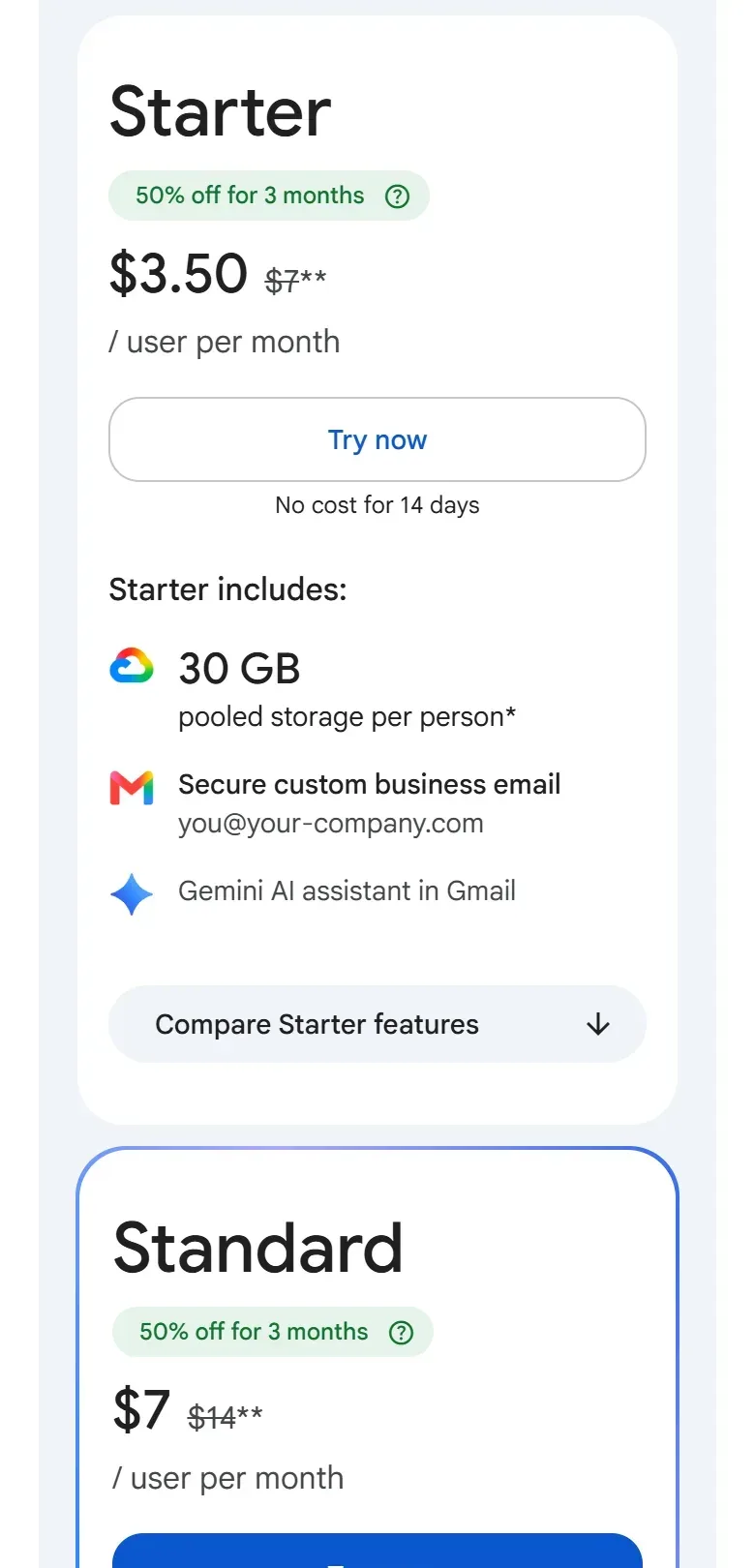
| Google Workspace Starter | $7 per user per month, one-year commitment | 30 GB pooled per user | Business Gmail, Meet for up to 100 participants |
| Google Workspace Standard | $14 per user per month, one-year commitment | 2 TB pooled per user | Meeting recording, Meet for up to 150 participants |
| Google Workspace Plus | $22 per user per month, one-year commitment | 5 TB pooled per user | Vault for retention and search, advanced device management |
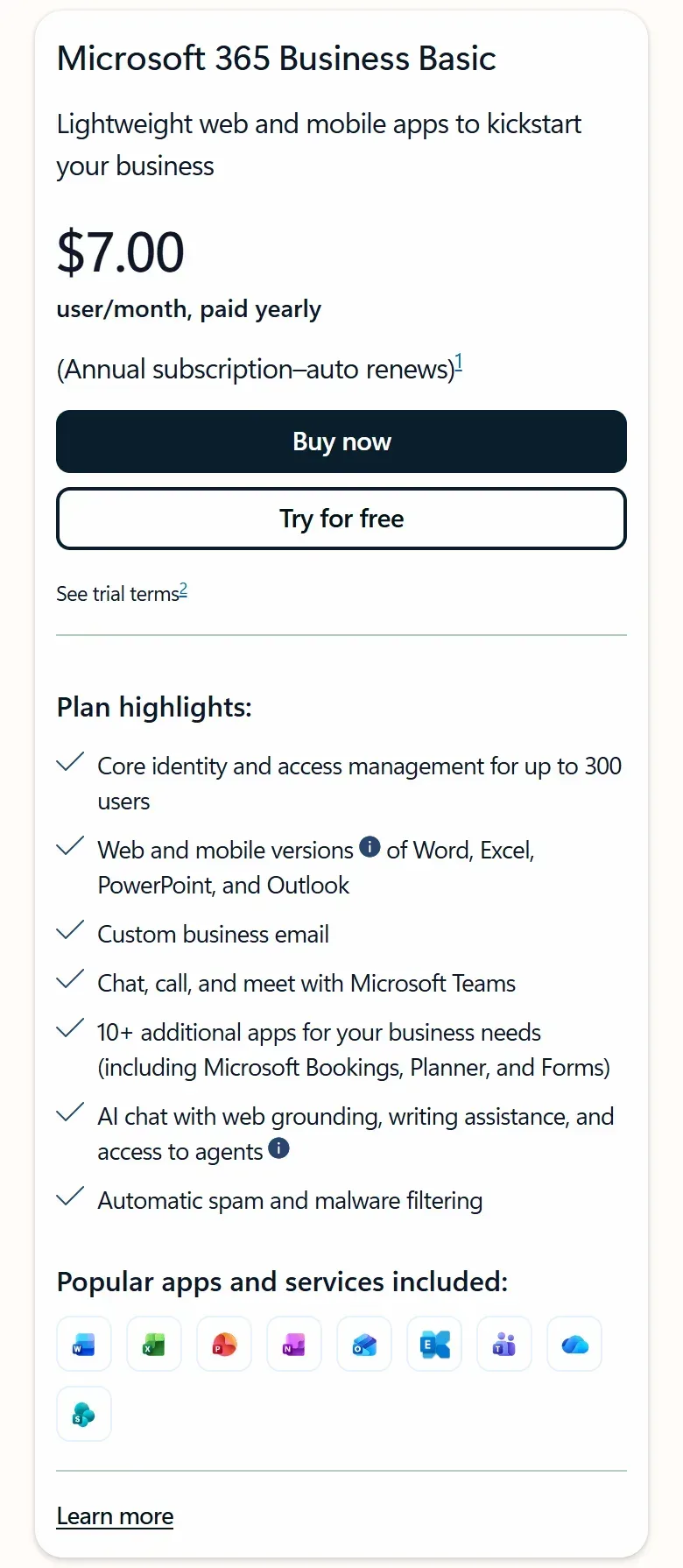
| Microsoft 365 Business Basic | $7.00 per user per month, paid yearly | 1 TB per user | Web and mobile Office apps only, Teams, business email |
| Microsoft 365 Business Standard with Copilot | $23.50 per user per month, paid yearly | 1 TB per user | Desktop Office apps on up to 5 PCs or Macs per user |
| Microsoft 365 Business Premium with Copilot | $32.00 per user per month, paid yearly | 1 TB per user | Adds device security and management and advanced email threat protection |
How to read this table: the two entry plans cost the same, so price does not settle the choice at the bottom. The gap opens in the middle, and it is mostly about what is bundled: Microsoft's featured Standard and Premium plans now include its Copilot AI assistant and the desktop Office programs, while Google's Standard plan is browser-based with far more storage. Prices are the ones each vendor listed when I wrote this; both change them, and Microsoft's page has further tabs with other versions of its plans, so I check the live page before I quote.
Two more notes on cost. Google shows an introductory discount for new customers; plan on the regular price, because the discount ends. And licenses are only one line. The other is the work: setup, migration and ongoing administration, which I cover further down.
What is actually different in daily work?
Feature lists for these two products run to hundreds of rows. For a small office, a handful of differences decide whether people are happy six months later.
Desktop programs or browser. Microsoft 365 is built around programs installed on the computer: Outlook, Word, Excel, PowerPoint. They work offline and handle very large spreadsheets and long, heavily formatted documents. Be careful with the entry plan: as the screenshot below shows, Business Basic includes only the web and mobile versions. Google Workspace is built for the browser. There is nothing to install, and several people typing in one document at once is the normal way of working.
Files from outside. If the people you work with send Word and Excel files, Microsoft 365 opens them exactly as they were made. Google can open and edit Office files, but complex formatting, tracked changes and spreadsheet macros (small automations built into a workbook) do not always survive a round trip. A law firm exchanging redlined contracts feels this quickly.
Email habits. Outlook sorts mail into folders and handles shared mailboxes, delegated calendars and rules in a way many offices have relied on for years. Gmail works with labels and search. Neither is wrong. Moving a team from one habit to the other costs real training time, and that cost belongs in the decision.
Storage. Google pools storage across the organization: 30 GB per user on Starter, 2 TB on Standard. Microsoft gives each user 1 TB of personal cloud storage on every business plan shown above, plus shared SharePoint space for the company. An office with large photo, video or drawing files should add up what it holds before choosing a tier.
Meetings and chat. Microsoft includes Teams; Google includes Meet and Chat. If your clients mostly send Teams invitations, or mostly send Meet links, joining is easy either way. Running your own meetings is smoother on the platform you pay for.
Device control. Both include basic rules for the phones that reach company mail. Deeper control of company laptops and phones comes with the higher tiers: Business Premium on the Microsoft side, Plus on the Google side.
Seven questions that decide it for your office
When I help a Dallas office choose, I ask these seven questions in this order. Most offices have their answer by the third.
- What does your main business software require? Practice management, accounting, agency management and document management programs often integrate with Outlook, Word or Excel. Ask the vendor which platform they support. This one answer outweighs everything below it.
- What do your clients and partners send you? Word documents with tracked changes and Excel workbooks with formulas point to Microsoft 365. Shared Google Docs links point to Google Workspace.
- What do your people already know? A team that has used Outlook for fifteen years will lose time on Gmail, and the reverse is just as true.
- Do you work offline or with very large files? Desktop programs handle both better. Browser-first work assumes a steady connection.
- How much do you store? Add up the shared drive or server today. It decides the tier, and sometimes the platform.
- What rules apply to your records? A law firm with retention and litigation-hold duties, or a dental or medical practice with patient information, needs specific settings and often a specific tier on either platform.
- Who will manage it? Someone has to add and remove users, watch the license bill and respond to security alerts. Choose the platform that person can run well.
Which answer points where
| If this describes your office | It usually points to | Why |
|---|---|---|
| Industry software integrates with Outlook or Office | Microsoft 365 | The integration is why the software vendor supports it |
| Heavy Excel use, macros, long formatted Word documents | Microsoft 365 with desktop apps | Full desktop features, files open as they were made |
| Everyone already uses Gmail and Google Docs | Google Workspace | No retraining, nothing to install |
| Small team, light documents, mostly browser work | Either entry plan | Same listed price; choose by habit |
| Company laptops need to be locked down and managed | A higher tier on either side | Device management is not in the entry plans |
How to read this table: find the row that sounds most like your office and treat it as a starting point, not a verdict. If two rows pull in different directions, the software requirement in the first row wins, because email can adapt to your business software and the reverse is rarely true.
If you are opening a new company and have none of this yet, my guide to IT for a Dallas startup shows where the email decision sits among the other first steps.
Law firms, dental and medical offices, insurance agencies and design studios
The industries I work with most have their own tilt.
Law firms. Legal work runs on Word. Courts and opposing counsel send Word files, redlines depend on tracked changes, and legal practice and document management software commonly ties into Outlook and Word. That makes Microsoft 365 the usual fit for a firm. Retention and litigation holds need to be planned into the tenant (your company's account on the platform) from the start. More on the daily support side is on my law firm IT support page.
Dental and medical practices. The practice management and imaging software decides most of it, so ask that vendor first. Either platform can be configured to help you meet HIPAA's technical safeguards, and both Microsoft and Google offer a business associate agreement for their business services. The platform alone does not make a practice compliant. The settings, the agreement and the staff habits do.
Insurance agencies. Agency management systems often work with Outlook and Excel for email logging and reports, which tends to favor Microsoft 365. Confirm with the system vendor.
Architecture and interior design firms. The question is file size. Large drawing and model files are usually better on storage designed for them than in either platform's sync folder, so the email choice and the file-storage choice are two separate decisions here.
In every one of these, the software vendor's supported list is a fact you can get in one phone call. Get it before you compare anything else.
Security: the settings matter more than the logo
Business owners often ask which platform is more secure. For a small office, the honest answer is that the setup decides it. A break-in at a small office usually traces back to a setting that was never turned on, and both platforms have those settings.
Whichever you choose, six things should be true on day one:
- Multi-factor authentication on every account, including the admin account. Google calls it 2-Step Verification. A stolen password alone should not open a mailbox.
- Mail authentication records (SPF, DKIM and DMARC) published for your domain, so other people cannot send mail that appears to come from you and your own mail is not rejected.
- Old sign-in methods switched off, because they skip the second factor entirely.
- Alerts for the signs of a hijacked mailbox: an unusual sign-in, a new forwarding rule, a mass deletion.
- A way to wipe company data from a lost phone or laptop.
- A written record of who holds the admin account, kept by the business owner and not only by the IT provider.
That last one is the easiest to overlook. If nobody can sign in as the administrator, nothing else on the list can be fixed quickly. My guide on being locked out of the Microsoft 365 admin account shows how that happens and how to recover.
Backup is a separate decision on both platforms. Microsoft and Google keep their services running. Restoring your data from last month is a different job, and I explain it in data backup and disaster recovery for a Dallas small business.
Who sets it up, and what does the setup involve?
You can sign up for either platform yourself with a credit card in a few minutes. Setting it up so that mail arrives reliably, nobody can forge your address and the next person can take it over is the part worth paying for. Here is what I do, in order.
- A short conversation. How many mailboxes, where the email lives today, what software must connect to it, how much data there is. From that I recommend a platform and tier and explain why.
- Create the tenant and verify your domain. The account is opened in your company's name, with you as the owner on record.
- Add the mail records. The records that route mail to the new system, plus SPF, DKIM and DMARC.
- Create users, groups and shared addresses. One user per person on the right license, with addresses like info@ and billing@ set up so the right people can see and answer them.
- Turn on the security settings from the list above before the first person signs in.
- Set up shared files with a folder structure and permissions that match how you work.
- Configure every computer and phone and show people where things are.
- Hand over the documentation: the admin details, the license list and what was set up.
You deal with me directly through all of it. I plan the work and stay your contact, and my team handles the day-to-day administration behind me. After setup, you can keep me on through managed IT services, where every user change, license adjustment and security alert is included in the monthly fee, or run it yourself and call when something is beyond you.
Switching from one to the other, or from an old email host
Many offices are not choosing from scratch. They are on a hosting company's mailboxes, a few personal Gmail accounts, an old Exchange server in a closet, or the other platform, and they want to know how painful a move is.
A planned migration follows the same pattern whatever the source:
- Copy in the background. Mail, calendars and contacts are copied to the new system while everyone keeps working on the old one.
- Cut over in the evening. The mail records are switched after hours, and a final sync catches the last few hours of messages.
- Morning check. Each person signs in, and I confirm folders, calendars and phone setup are where they expect.
- Keep the old system readable for a while as a safety net before it is closed.
Mail moves cleanly between the two platforms. Files take more thought. Google Docs and Sheets are converted when they move to Microsoft 365, and Office files can stay as they are or be converted when they move to Google. Either way, shared links break and need to be re-shared, and complicated spreadsheets should be opened and checked by the people who own them. I build that checking time into the plan so it does not surprise anyone.
If the email move is part of leaving your current provider, read how to switch IT companies without downtime, because the admin account handover needs to happen first. And if the files are coming off an office server, that is its own project: see moving files from an old server to SharePoint and OneDrive.
What does setup and ongoing support cost with Cross River Tech?
There are three parts, and I keep them separate so you can see each one.
What you pay for, and how each part is priced
| Part | How it is priced |
|---|---|
| Microsoft or Google licenses | Passed through at the published subscription price |
| New setup or migration | Fixed project quote after a short conversation about your mailboxes and data |
| Ongoing administration | Included in managed IT, billed per user or per device per month, month-to-month |
| One-off help, remote | $100 per hour in business hours; $150 per hour after hours, weekends and holidays |
| One-off help, onsite | $150 per hour in business hours; $225 per hour after hours, weekends and holidays |
How to read this table: the license line is the same whoever you buy from, so compare providers on the other rows. Hourly work has a one-hour minimum and is billed by the hour. Business hours are Monday to Friday, 8 AM to 5 PM Central.
Because I source the licenses, I see the invoice every month. That is how the usual waste gets caught: people who left still holding a paid license, shared addresses paying for a seat they do not need, everyone on a higher tier than their work requires.
If you want a recommendation for your office, call or text (214) 612-7080, or send me a short note with how many people you have, where your email lives now and the main software you use. I will tell you which platform I would choose, which tier, and what the move would cost.
Questions people ask
Is Google Workspace cheaper than Microsoft 365 for a small business?
At the entry level they are listed at the same price: Google Workspace Starter and Microsoft 365 Business Basic each show $7 per user per month on a yearly term on the vendors' own pages. Above that, the plans bundle different things, so compare what your people need, such as desktop Office programs, storage and meeting recording, and price that tier on each side.
Can I use Word and Excel if my office is on Google Workspace?
Yes, in two ways. Google Docs and Sheets can open and edit Word and Excel files in the browser, which is fine for simple documents. For tracked changes, macros and complex formatting, you would still buy the desktop Office programs separately. If most of your work is in Word and Excel, Microsoft 365 with desktop apps is usually simpler than paying for both.
Does Microsoft 365 Business Basic include Outlook and Word on my computer?
No. Microsoft lists Business Basic with the web and mobile versions of Word, Excel, PowerPoint and Outlook. You use them in a browser or on a phone. The desktop programs installed on a PC or Mac come with the Standard and Premium plans. Offices often mix tiers, giving desktop apps only to the people who need them.
Who sets up Microsoft 365 or Google Workspace for a small business in Dallas?
Cross River Tech does. I am Anthony Omini, the owner, and I set up, migrate, secure and administer both platforms for small businesses across Dallas–Fort Worth, and remotely anywhere in Texas. Setup and migration are quoted as a fixed project. Ongoing administration is included in my month-to-month managed IT plan, or available at my hourly rates with no contract.
Will we lose email if we switch between Google Workspace and Microsoft 365?
A planned migration is designed so you do not. Mail, calendars and contacts are copied to the new system in the background while everyone keeps working. The switch happens in the evening, followed by a final sync for the last few hours of messages. The old system stays readable for a while afterward as a safety net.
Are Google Workspace and Microsoft 365 HIPAA compliant?
Neither is compliant out of the box, and no product can be. Both can be configured to help a dental or medical practice meet HIPAA's technical safeguards, and both vendors offer a business associate agreement for their business services. The practice still needs the right settings turned on, the agreement in place and staff who follow the rules.
Can part of the office use Google and part use Microsoft?
It is possible, but I rarely recommend it for a small office. Two platforms mean two admin consoles, two sets of security settings, two bills and calendars that do not see each other well. A common, cleaner version is one platform for email and files for everyone, with desktop Office licenses added only for the people who need them.
Sources and further reading
Market price ranges in this article are my own observation of quotes in the Dallas market, not a published survey. Where I state a rule or a standard, the source is linked above.