
What does an IT consultant do for a small business in Dallas, and when do you need one instead of a help desk?
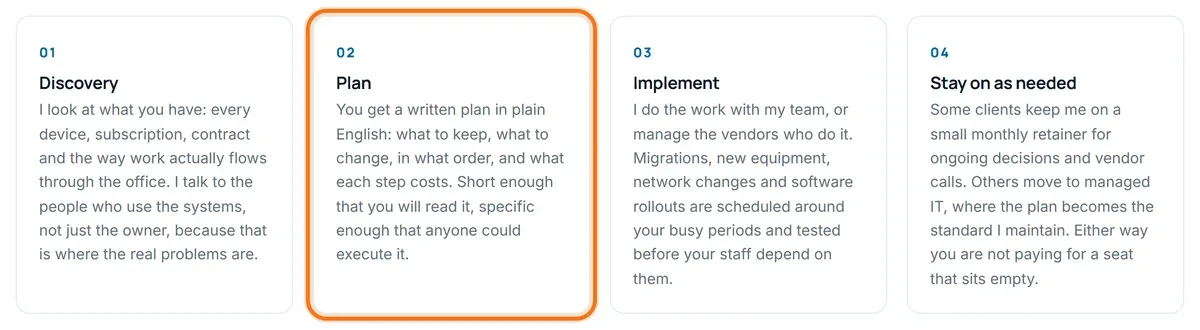
An IT consultant, or fractional CTO, owns the technology decisions a 5 to 50 person Dallas company has no one to make: an assessment of what you run, a written plan and budget for the next one to three years, software and vendor choices, a security baseline, and a seat at the table before a move or a new system. A help desk fixes problems. A consultant decides what you build next.
Answered by Anthony Omini, Cross River Tech, Dallas

Key takeaways
- An IT consultant delivers decisions and a plan: an assessment of your current setup, a written roadmap, a 12 to 36 month budget, vendor and software choices and a security baseline.
- A help desk or managed IT keeps today's systems running; a consultant decides what those systems should be. Many small companies need both, a few hours of planning and a monthly plan to maintain it.
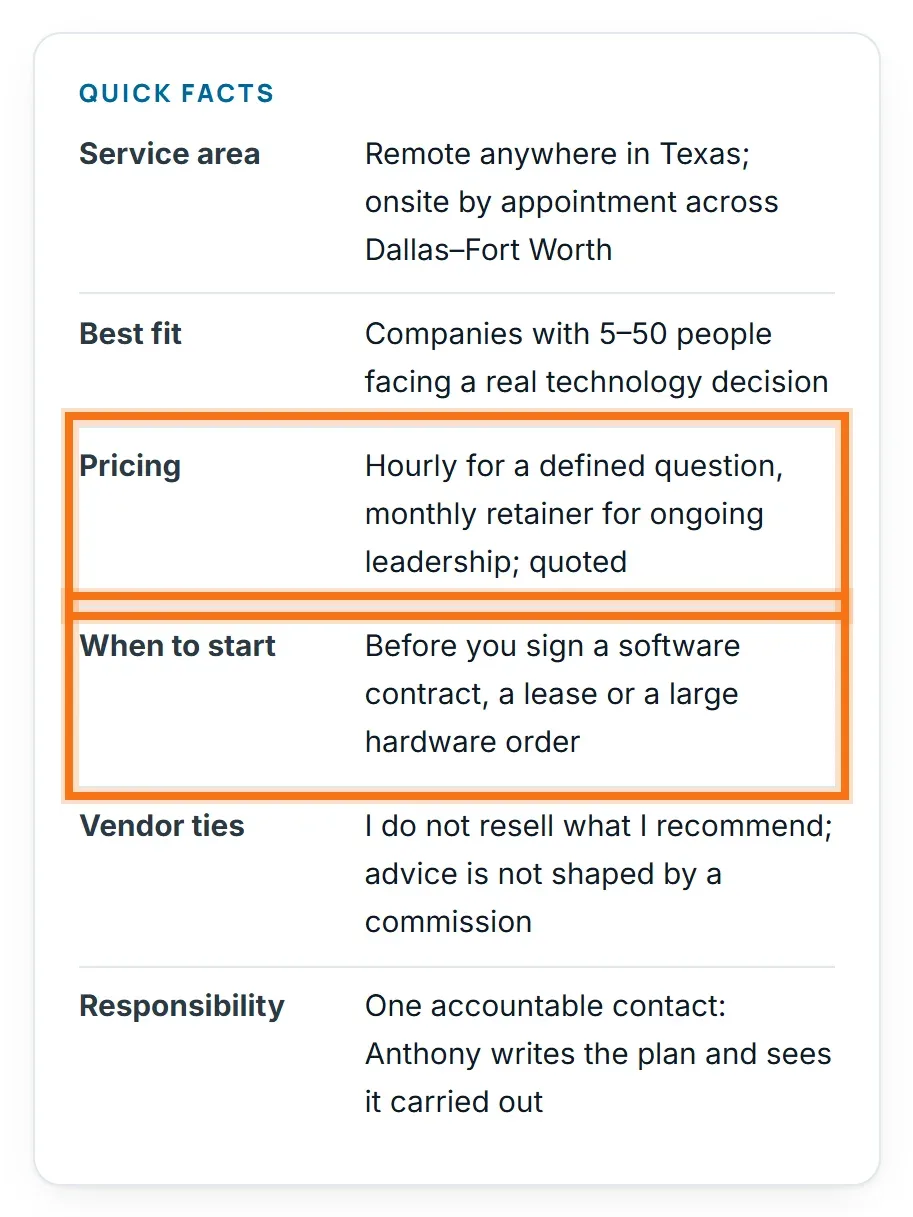
- The best time to bring one in is before you sign: a lease, a software contract or a large hardware order.
- A good plan names what to keep as well as what to buy, prices every step, and puts the admin passwords and contracts in your name.
- Consulting is billed hourly for a defined question, on a monthly retainer for ongoing leadership, or as a fixed project quote with a written scope.
What does an IT consultant do for a small business in Dallas?
An IT consultant, often called a fractional CTO when the role is ongoing, makes the technology decisions a small company has no one to own. For a Dallas business with 5 to 50 people that means looking at what you run today, writing down what it should look like, putting a price and an order on the changes, choosing the vendors, setting a security baseline and being in the room before a move, a new office or a new piece of business software. A help desk fixes what breaks; a consultant decides what you build.
I am Anthony Omini, the owner of Cross River Tech, and I do this work for companies across Dallas, Plano, Richardson, Irving and the rest of Dallas–Fort Worth. These are the six things you should walk away with:
| Deliverable | What it looks like in practice | Why it matters to the owner |
|---|---|---|
| Assessment of the current setup | Every computer, server, network device, subscription and contract, with age and renewal date | You learn what you pay for, what is near end of life and who holds the passwords |
| Written technology plan (roadmap) | A few pages in plain English: what to keep, what to change, in what order | Decisions are made once, with the whole picture, not one vendor pitch at a time |
| Budget for the next 12 to 36 months | Replacement cycles, license costs, projects and a reserve, by quarter | No surprise renewals and no equipment bought in a panic after a failure |
| Vendor and software selection | A short list, a recommendation, and the contract read before you sign | You avoid lock-in, auto-renewals and tools that do not fit how the office works |
| Security baseline | Multi-factor sign-in, backups, endpoint protection, admin accounts and offboarding, written down | It is what your cyber-insurance renewal asks about, and what stops the expensive mistakes |
| A seat at the decision table | Present for the lease, the build-out, a merger, a new line-of-business app | The IT cost and timeline are known before the commitment, not after |
How to read this table: the first three rows are documents you keep, even if you never work with me again. The last three are judgement, applied when a decision comes up. Documents alone leave you with a binder; opinions alone leave you nothing to hold anyone to. The full scope of what I offer is on my IT consulting in Dallas page.
IT consultant vs managed IT vs an hourly help desk: which do you need?
Most small Dallas companies need a consultant for a few hours at the right moments and a support arrangement for every other day. Mixing them up is how owners end up with a help desk making strategy calls, or a consultant resetting passwords.
| Question | IT consultant / fractional CTO | Managed IT | Hourly help (break/fix) |
|---|---|---|---|
| What it is for | Decisions, plans and projects | Keeping everything running every day | Fixing a specific problem now |
| Typical question | "Keep the server or move to the cloud before the lease ends?" | "Outlook will not open on the front desk computer." | "The printer stopped scanning to email." |
| What you receive | A written plan, a budget, a recommendation, an implemented project | Updates, monitoring, backups, security and unlimited remote support | A fix and an invoice for the hours |
| How it is billed | Hourly, monthly retainer or fixed project quote | Per user or per device, monthly | By the hour, published rates |
How to read this table: read down the column that matches the question you have today. If your question is about tomorrow ("what to buy, change or sign"), it is consulting. If it is about keeping today's setup healthy, it is managed IT services. If something is simply broken, hourly help is the fastest route. With me, the plan I write becomes the standard my team maintains if you move to a managed plan, so nobody learns your setup twice.
Still deciding whether you need outside help at all? Do I need an IT guy or managed IT and internal IT person vs MSP cover that choice.
Signs your Dallas company needs a consultant, not just a help desk
A help desk is enough while your IT questions are all about things that already exist. You need someone senior on your side when the questions start being about what comes next. These are the signs I see most often in offices around Dallas, Plano and Richardson:
- You are about to sign something big. A lease, a build-out, a software contract for the whole office or a large computer order. This is the cheapest moment for advice, because a bad choice still costs nothing to undo.
- The office manager has become the IT department. They hold the passwords, call the vendors and lose half a day a week to it.
- Nobody can say what you pay for. Subscriptions were added one at a time on different cards, and the monthly total keeps creeping up.
- The cyber-insurance renewal asks questions nobody can answer. Guessing on that form is a risk of its own.
- Headcount has outgrown the setup. A network built for eight people now serves twenty-five, and the Wi-Fi and shared-drive complaints never stop.
- Old equipment is reaching the end. A server out of support, or office computers still on Windows 10, means a replacement decision is coming whether you plan it or not.
- Your current IT company only reacts. Tickets get closed, but nobody has shown you a plan or a budget for next year.
If two or more of these are true, a few hours of planning usually save more than they cost. If none are, you may simply need good support first; when a small business should hire an IT company covers that earlier stage. Not sure which side of the line you are on? Tell me what you are trying to decide and I will say honestly whether it needs a consultant at all.
Which decisions should a consultant sit in on?
The ones where the IT cost or timeline gets set by someone who is not thinking about IT. Usually these five:
- A move or a new office. The landlord, contractor and broker all work on the space, but somebody has to own the internet order, the cabling, the IT room and the day your people sit down and work. Internet for a new suite in Uptown, Las Colinas or along the Dallas North Tollway can take longer to install than the build-out schedule assumes, and that gap is where moves go wrong. My office move and new office setup service does the work; the consulting part is getting the order and timing right before anything is signed.
- A new line-of-business application. Practice management, an agency management system, accounting or design software. Someone has to check it fits your computers, network, security and workflow, and that the data can come back out if you leave.
- Email and files. Keeping an office file server, moving to SharePoint and OneDrive, or choosing between Google Workspace and Microsoft 365.
- A second location, a merger or a jump in headcount. Deciding the standard once saves arguing about it at every desk.
- Phones. A phone system touches the internet, the network and every desk, so plan it with them.
In each case my job is to put the IT cost, risk and timeline on the table before the commitment, and to translate when a vendor's pitch sounds better than the contract reads. I do not resell what I recommend, so the advice is not shaped by a commission.
What security baseline should an IT plan include?
Every plan I write has a security section, because it is the part most small companies have skipped and the part their cyber-insurance carrier asks about. For each item it says whether it is in place, what closing the gap involves and who keeps it in place.
| Baseline item | What "done" looks like | Who keeps it in place |
|---|---|---|
| Multi-factor sign-in | On email, remote access, banking and every admin account, with no exceptions for the owner | Your IT support, checked when anyone joins or leaves |
| Backups | Email, shared files and any server backed up offsite, in a copy ransomware cannot alter, with restores tested on purpose | Your IT support, with a test logged on a schedule |
| Endpoint protection and updates | Every computer protected and patched, including laptops that live at home | Your IT support, monitored |
| Admin accounts | Separate admin logins, held in the company's name, with at least two people able to reach them | The owner, with IT support holding a documented copy |
| Offboarding | A checklist that removes access the day someone leaves, including software and vendor portals | The office manager and IT support together |
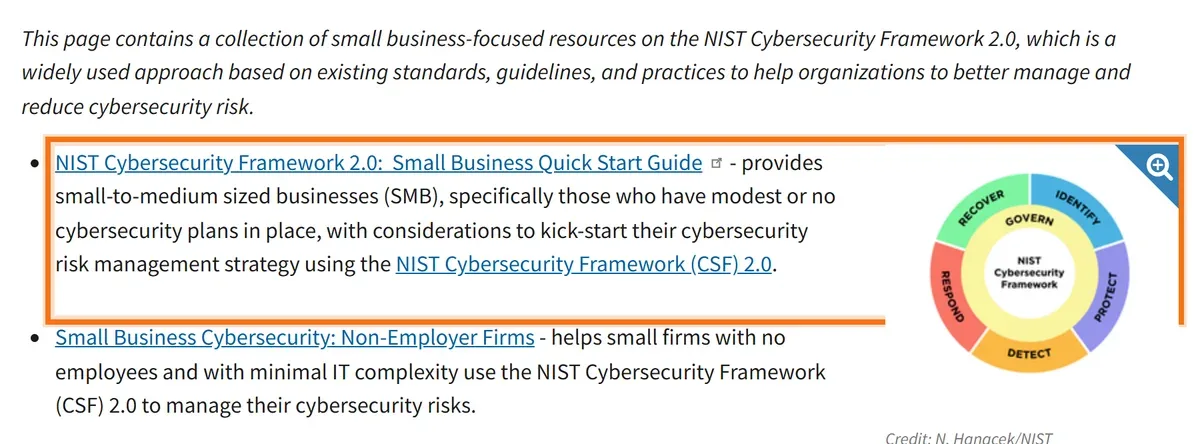
How to read this table: the middle column is the standard to measure against, and the right column is the part most plans forget. A baseline nobody is assigned to keep slips back within months. For an official yardstick, the free NIST Cybersecurity Framework 2.0 Small Business Quick Start Guide groups this work into six functions: govern, identify, protect, detect, respond and recover. My cybersecurity and backup service is how these items stay in place once the plan is done, and if a renewal form has already come back with gaps, what to do after a failed cyber-insurance questionnaire takes it in order. Which laws apply to you is a question for your attorney.
What should you bring to the first meeting with an IT consultant?
How a first meeting with any IT company runs is covered in what to expect at a first meeting with an IT company. For a consulting conversation, bring what you have; none of it needs to be tidy:
- The decision you are facing, in one sentence, and the date it has to be made by: a lease signing, a software renewal, a hire start date.
- What you pay for: recent software, internet, phone and IT invoices.
- Contracts with renewal dates: IT, software, copier, phone and internet.
- Who uses what: people, roles, and who works outside the office.
- Your growth plan, even a guess: hires, a second location, a move.
- The last cyber-insurance questionnaire, if you have one.
- What annoys people most. Ask two or three staff first; the real problems are usually there.
Do not bring a shopping list. Bring the reason you think you need twelve laptops; sometimes the answer is twelve laptops, sometimes a network fix and four.
How do you judge an IT consultant's plan?
Use these tests on any plan you receive, including mine:
| Test | A good plan | A weak plan |
|---|---|---|
| Does it start from your business? | Ties each change to how the company makes money or loses time | Starts from products and model numbers |
| Does it say what to keep? | Names equipment and software that is fine as it is | Replaces almost everything |
| Is every step priced? | Each item has a cost or a range and a quarter it falls in | One total, or no numbers at all |
| Is there an order? | Security and backups first, nice-to-haves later, tied to renewal and lease dates | A list with no sequence |
| Who owns the accounts? | Admin logins, domains and licenses in the company's name | Silent on it, or everything under the provider |
| Could someone else carry it out? | Specific enough that another IT company could follow it | Only makes sense if you buy from the author |
How to read this table: a plan that fails the "what to keep" or "someone else could carry it out" rows is usually a sales quote in a nicer format. If you are comparing support offers rather than plans, how to compare IT support quotes has a separate checklist for that.
How is IT consulting billed in Dallas?
I bill consulting one of three ways and quote it after a conversation. There is no published consulting rate, because a two-hour contract review and a six-month build-out are different jobs.
- Hourly, for a defined question. Reviewing a software contract, comparing two options, designing the network for a new suite.
- A monthly retainer, for ongoing leadership. Set hours each month for planning, vendor calls and the small decisions that otherwise land on the owner. No minimum term.
- A fixed project quote, for a defined project. A move, a migration or a new office, with a written scope so you know what is included before work starts.
Day-to-day support is separate: managed IT is quoted per user or per device per month, month to month, and my hourly rates are published: $100 per hour remote and $150 per hour onsite during business hours (Monday to Friday, 8 AM to 5 PM Central), $150 remote and $225 onsite after hours, with a one-hour minimum. The pricing page lays all of it side by side, and hourly vs monthly IT support explains when each one costs less.
The plan should leave you with a number for the year; what a small business should budget for IT shows how that number is built. Once a plan exists, a yearly review against it is short, which is what the annual office technology checkup is for.
Mistakes to avoid when you hire an IT consultant
Most expensive IT mistakes I clean up in Dallas offices were made before anyone asked for advice:
- Buying hardware before the plan. New computers for a network that cannot carry them, or a server bought months before the files moved to the cloud. Plan first; the order of purchases usually changes.
- Vendor lock-in you did not notice. Multi-year terms that auto-renew, data that exports in a format nothing else reads, or a domain and admin accounts in a provider's name. Before signing, ask how you would leave and who holds the keys. Who owns your IT when you change providers lists what should always be in your name.
- Letting the seller be the consultant. A vendor's free assessment is part of a sales process and rarely concludes you need less of what they sell.
- A plan that sits on a shelf. If no one is responsible for carrying it out, it goes stale. Ask who implements each step before you pay for the plan.
- Treating security as a later phase. Multi-factor sign-in and tested backups cost little and belong at the start, not after the new furniture.
Why Dallas companies use Cross River Tech for IT consulting
Cross River Tech is a small, owner-led IT company in Dallas, and you deal with me directly. I have over 15 years of IT experience across many industries and global organizations, and I bring that to companies with 5 to 50 people that have outgrown ad-hoc IT but cannot justify a full-time technology executive. I write the plan and stay your contact while it is carried out, with my team handling the routine work behind me, so the person who made the recommendation is accountable for whether it works.
I am also honest about fit. If your question is really about day-to-day support, I will say so instead of selling you a plan. If you need a full-time, in-house technology leader or custom software development, a different kind of firm fits better.
I work onsite by appointment across Dallas–Fort Worth, including Plano, Frisco, Richardson, Addison, Irving and Fort Worth, and remotely with companies anywhere in Texas. To start, send me the decision you are facing and the date it has to be made by. I will tell you whether it needs a consultant, a managed plan or a couple of hours of help, and what that would cost. Book a call through the contact page or call (214) 612-7080.
Questions people ask
What does an IT consultant do for a small business?
An IT consultant assesses the technology a company runs, writes a plan for what to keep and change, budgets it for the next one to three years, chooses vendors and software, sets a security baseline, and advises before big commitments such as a lease or a new system. For a 5 to 50 person Dallas company it replaces guesswork with a written plan someone is accountable for.
What is the difference between an IT consultant and a help desk?
A help desk fixes problems with the systems you already have: a computer that will not start, a mailbox that will not sync. An IT consultant decides what those systems should be, what to spend and in what order. Most small companies need both, a few hours of planning at the right moments and a support arrangement to keep things running every day.
Is a fractional CTO the same as an IT consultant?
They overlap. An IT consultant is often brought in for one question or project, such as choosing software or planning a move. A fractional CTO is the same senior role kept on part-time, usually on a monthly retainer, to own technology decisions month after month. Small companies often start with a project and keep the relationship if it proves useful.
When should a small business hire an IT consultant?
Before signing something large: a lease, a software contract for the whole office or a big hardware order. Other good moments are when the office manager has become the IT department, when a cyber-insurance renewal asks questions nobody can answer, when headcount has outgrown the setup, or when a server or batch of computers is near the end of support.
How much does an IT consultant cost in Dallas?
Cross River Tech quotes consulting after a conversation, because a two-hour contract review and a months-long office build-out are different jobs. It is billed hourly for a defined question, on a monthly retainer for ongoing leadership, or as a fixed project quote with a written scope. For simple repairs, hourly support has published rates: $100 per hour remote and $150 onsite during business hours.
What should an IT plan for a small business include?
An inventory of devices, subscriptions and contracts; what to keep and what to change, in order; a cost for each step and a budget for the next 12 to 36 months; vendor and software choices with contract notes; a security baseline covering multi-factor sign-in, backups, endpoint protection, admin accounts and offboarding; and who carries out each step afterwards.
Can the same company do the consulting and the day-to-day support?
Yes, and it often works better, because the plan becomes the standard the support team maintains and nobody has to learn your setup twice. The risk is a plan that only makes sense if you buy from its author, so ask whether another IT company could follow it. At Cross River Tech the plan is written so anyone could carry it out.