Key takeaways
- I install racks and patch panels as part of data cabling and IT room setup for Dallas offices, and I also configure the switch, firewall and access points that go in the rack.
- A patch panel is the fixed landing point for every office cable; you never touch the permanent runs again, you only move short patch cords.
- Most small offices need a wall-mount rack of 6 to 12 rack units; a floor-standing rack makes sense once you have a server, a large UPS or more than two switches.
- The IT room needs a dedicated power circuit, some cooling, a clear path for cable and a door that locks, and it should sit near the middle of the suite to keep runs short.
- A finished rack should come with labels at both ends, test results for every run and a port map, or you will pay for that missing paperwork every time something changes.
Who installs a server rack and patch panel in Dallas? I do, as part of the cabling
If you need a server rack and patch panel installed in a Dallas office, this is work I do myself as part of data cabling and IT room setup. I mount the rack, land every cable on the patch panel, terminate and test each port, and then install and configure the switch, firewall, access points and battery backup that make the rack useful. You deal with me from the first cable pull to the moment the office is online.
That last part matters more than it sounds. Plenty of cabling companies will punch down a clean patch panel and leave. Plenty of IT companies will configure a switch but will not run cable. The rack is where those two jobs meet, and when they belong to two different vendors, the rack is where the finger-pointing starts. When both jobs are mine, there is nobody to point at.
This article explains what a rack and patch panel actually do, how to choose between a wall-mount and a floor-standing rack, where the IT room should go, what goes in the rack from top to bottom, and how the installation runs. If you already know what you need, send me the address and a floor plan and I will quote it after a walkthrough.
What does a patch panel do, and why not just plug cables into the switch?
A patch panel is a strip of numbered ports mounted in the rack. Every permanent cable run from the office terminates on the back of one of those ports. The front of the port then connects to the switch with a short patch cord. That is the whole idea, and it is worth understanding because it explains why it is worth paying for.
The permanent cable in the wall and ceiling is the expensive, hard-to-replace part. Solid-core Cat6 is stiff, it is punched down rather than crimped, and it is not designed to be plugged and unplugged. If you crimp a plug on the end of it and push it straight into a switch, every time someone swaps a switch, moves a port or tugs a cable, the fragile end takes the strain. Eventually a pair breaks and a desk goes dead, and nobody knows which cable it was because nothing is labeled.
With a patch panel, the permanent run is touched once, at installation, and then left alone. Everything after that happens with cheap, flexible patch cords on the front. Need to move a user to a different switch? Move a patch cord. Need to replace a switch? Unplug 24 patch cords, plug them into the new one in the same order. Need to find which jack in the office is port 17? Read the label.
The patch panel is also where testing happens. Each port gets tested end to end after termination, and the results are what tell you the office cabling is right before a single computer is plugged in.
Wall-mount or floor-standing rack: which one does my office need?
Racks are measured in rack units, written as "U". One U is 1.75 inches of vertical space, and every piece of equipment is a whole number of U tall. A patch panel is 1U, most switches are 1U, a small firewall is 1U, a battery backup is 1U or 2U. Count what you need and add room to grow.
| Wall-mount rack or cabinet | Floor-standing rack | |
|---|---|---|
| Typical size | 6U to 15U | 24U to 42U |
| Best for | Offices up to roughly 50 drops with no on-premise server | Offices with a server, storage, multiple switches or a large battery backup |
| Footprint | Takes no floor space; needs solid wall backing | Needs floor space and clearance front and back |
| Weight it can hold | Light equipment only | Servers and heavy UPS units |
| Cooling | Usually fine in a normal room | Often needs dedicated cooling |
| Cost | Lower | Higher, plus the room to put it in |
For most small Dallas offices, a 9U or 12U wall-mount rack is the right answer. It holds a 24- or 48-port patch panel, a switch, a firewall, the internet provider's modem on a shelf, a small battery backup and cable management, with a few U spare. A hinged wall cabinet with a locking door is a good upgrade in a shared closet or anywhere the public can reach it.
Go to a floor-standing rack when there is a real server, a storage unit or a second switch, or when the battery backup is heavy enough that you would not want it on drywall. A floor rack in a corner of a proper IT room, with the patch panel at the top and the heavy items at the bottom, will serve an office for a very long time.
Where should the rack and IT room go?
The location of the rack decides how long every cable run is, how hot the equipment gets and how safe it is. It is worth thinking about before the walls are drawn, and it is the first thing I look at on a walkthrough. What a good IT room or closet has:
- A central location. Cat6 runs are limited to about 295 feet. A closet near the middle of the suite keeps every run short and leaves room for the building to grow.
- Its own power circuit. A dedicated 20-amp circuit for the rack means the coffee maker or a space heater cannot trip the breaker that runs your network.
- Some cooling. A switch, firewall and modem in a closed closet can heat the room noticeably. A supply vent, a louvered door or a small exhaust fan is usually enough for a wall-mount setup. A server needs more.
- A clear path in the ceiling. All of the office cable has to arrive here. A closet with a clear ceiling path is easy; one boxed in by ductwork is not.
- A door that locks. Client files, patient data and your firewall live here. It should not be the same closet as the mop and the cleaning supplies, and the cleaning crew should not have a key.
- Plywood backing on the wall for a wall-mount rack, so it is fastened to something that can hold the weight.
Where the rack should not go: above the ceiling tiles, under a sink, in a closet with a water heater, in the kitchen, or in a corner of an open office where anyone can pull a cable. I see all of these regularly in existing offices, and they are the reason many networks are unreliable.
What goes in the rack, from top to bottom
A standard small-office rack, whether wall-mount or floor-standing, is built in a consistent order. This is the layout I use, and it is worth knowing so you can recognize a well-organized rack when you see one:
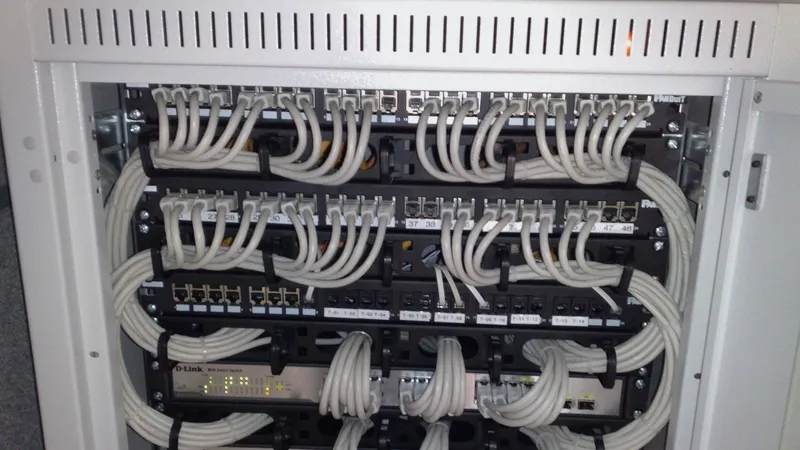
- Patch panel at the top, where all the office cable lands. 24 or 48 ports, sometimes two panels.
- Horizontal cable manager directly below it, a 1U bar that keeps patch cords tidy between the panel and the switch.
- Network switch, with Power over Ethernet ports if you have phones, access points or cameras, since those get their power through the data cable.
- Firewall or router, the device that sits between the office and the internet and controls what gets in.
- Shelf for the internet provider's modem and any odd-shaped equipment that does not mount in a rack.
- Server or storage unit, if the office has one, mounted on rails.
- Battery backup (an uninterruptible power supply, or UPS) at the bottom, because it is the heaviest item and it keeps the network up through a short outage and shuts equipment down cleanly through a long one.
- Power distribution unit, a rack-mounted power strip, so every device plugs into the battery backup, not the wall.
Everything in that list except the modem is something I supply and configure as part of the job. I work with Dell and Lenovo for servers and with business-grade switches and firewalls I can manage remotely afterwards, which is how ongoing support stays fast: I can see the rack from my desk, and most fixes never need a site visit.
How the installation goes, step by step
Rack and patch panel installation is usually the final stage of a cabling job, but it can also be a standalone project in an existing office. Either way, this is the order of work:
- Walkthrough and plan. I confirm the rack location, the power, the ceiling path and the drop count, and quote it in writing. For a new build-out, this happens from plans before the walls close.
- Mount the rack. Plywood backer and lag bolts for a wall-mount, levelled and anchored feet for a floor rack.
- Bring the cable in. All of the office runs are routed into the rack through a ladder tray or a wall entry, dressed neatly and bundled by destination.
- Punch down and label. Each cable is terminated on the patch panel in a logical order, usually grouped by room, and labeled at the panel and the wall jack with the same number.
- Test every run. A cable tester checks wiring, length and performance on each port. Any run that fails is fixed before anything is plugged in.
- Install and configure the equipment. Switch, firewall, battery backup, and access points go in, get configured, and get connected to the internet provider's circuit.
- Patch and document. Patch cords connect panel ports to switch ports, and you receive a port map showing which jack in the office goes to which panel port and switch port.
For a typical small office with a wall-mount rack, the rack and equipment stage takes about a day once the cable is pulled. In an occupied office, I schedule the switch-over for after hours or a weekend so nobody loses a working day. If the rack is part of a move, server room relocation covers how the old equipment gets from the old space into the new rack.
What a finished installation should hand you
A rack that looks tidy is nice. A rack that comes with paperwork is what saves you money for the next ten years. When any installer, including me, finishes a rack and patch panel job, you should walk away with:
- Labels at both ends of every run, matching numbers on the panel and the wall jacks.
- Test results for every port, showing it passed for the cable's rated speed.
- A port map: jack number, room, panel port, switch port. A simple spreadsheet is fine.
- The equipment list with model numbers and where each device sits in the rack.
- The admin logins for the switch, firewall and access points, stored somewhere you control, not only in the installer's head.
- Spare capacity: empty panel ports and a few U of rack space for whatever comes next.
If a quote does not mention testing and documentation, ask. The cost of skipping it shows up the first time a desk stops working and somebody has to trace an unlabelled cable through the ceiling to find out why. Documentation is also what makes it possible to change IT providers without starting over, and I would rather you keep me because the service is good than because no other provider could figure out the rack.
Adding a rack to an existing office that never had one
A lot of Dallas offices grew one cable at a time. There is a consumer router on a shelf, a couple of unmanaged switches daisy-chained under desks, and a bundle of cables with plugs crimped straight on, none of them labeled. It works until it does not, and when it fails, nobody can tell what is connected to what.
Retrofitting a rack into this kind of office is a very common project for me, and it does not require re-cabling the whole suite. The usual approach: mount a small wall-mount rack in the best available closet, pull the existing runs back to that point where they reach, re-terminate them on a patch panel, test each one, and replace the runs that fail or fall short. Then the tangle of little switches gets replaced with one proper switch, the consumer router with a business firewall, and everything goes on a battery backup. Most of the time the office is disrupted for a few hours after close, not a full day.
The cost depends on how many existing runs can be reused and how many need to be replaced, which is exactly the kind of thing a walkthrough answers. If you are budgeting, what structured cabling costs for a Dallas office explains the per-drop side, and the rack and equipment are quoted as their own lines so you can see both halves clearly.
Mistakes I fix most often in racks other people installed
Some of these come from cheap installs, some from good installs that nobody maintained. All of them are avoidable:
- No labels. The single most expensive omission, because it turns every future change into detective work.
- Solid cable plugged straight into the switch with no patch panel, so the permanent runs get damaged over time.
- Equipment plugged into the wall next to a battery backup that is protecting nothing.
- Rack screwed into drywall with no backer, slowly pulling out of the wall.
- Riser cable in a plenum ceiling, which is a code issue as well as a safety one.
- The modem in one closet and the switch in another, joined by a long cable nobody remembers running.
- A consumer router doing the firewall's job, which is how offices end up on cyber-insurance questionnaires answering "no" to questions they should be answering "yes" to.
None of these need a full rebuild. A half day of cleanup with the right parts turns most of them into a rack you would be happy to show a client. If you would like me to look at yours, get in touch and describe what you have, or send a photo. I will tell you honestly whether it needs a tidy-up or a proper reinstall.
Questions people ask
Who installs server racks and patch panels for offices in Dallas?
I do, as part of data cabling and IT room setup for offices across Dallas and the surrounding metroplex. I mount the rack, terminate and test every cable on the patch panel, then install and configure the switch, firewall, access points and battery backup. One company handles the cable and the network, so nothing falls between two vendors.
Do I need a patch panel for a small office?
Yes, for anything beyond a handful of desks. The patch panel protects the permanent cable in the walls, which is punched down once and never handled again. All future changes happen with short patch cords on the front. Without one, cables get crimped straight into a switch, ends break over time and nobody can tell which run goes where.
What size rack does a small office need?
Most small offices do well with a 9U or 12U wall-mount rack. That holds a 24- or 48-port patch panel, a switch, a firewall, a shelf for the modem, a small battery backup and cable management, with a few units to spare. Move to a floor-standing rack when you add a server, a storage unit, a second switch or a heavy battery backup.
Where should the rack be located in the office?
In a lockable closet near the middle of the suite, with a dedicated power circuit, some airflow and a clear path in the ceiling for cable. Central placement keeps every run short and inside the Cat6 length limit. Avoid kitchens, closets with water heaters or sinks, shared janitor closets and open areas where anyone can reach the equipment.
How long does a rack and patch panel installation take?
For a typical small office with 24 to 48 drops and a wall-mount rack, the rack, termination, testing and equipment setup take about a day once the cable is pulled. In an occupied office I schedule the switch-over after hours or on a weekend. Retrofitting a rack into an existing office is usually a few hours after close.
Can you install a rack in an office that already has cabling?
Yes. I mount a rack in the best available location, pull the existing runs back to it, re-terminate them on a patch panel and test each one. Runs that fail or do not reach are replaced. Then the mix of small switches and the consumer router are replaced with a proper switch and firewall on a battery backup. Most of the existing cable is usually reusable.