How much does IT support cost for a dental office in Dallas?
Managed IT for a Dallas dental office is quoted per user or per device per month. Across the Dallas market that is commonly around $100 to $175 per user, a typical range rather than my price list. I am Anthony Omini of Cross River Tech: I quote each practice after a short conversation, month to month, and hourly help with no contract is $100 remote or $150 onsite.
Answered by Anthony Omini, Cross River Tech, Dallas
Key takeaways
- Most IT companies quote a dental office per user or per device per month; in the Dallas market that is commonly around $100 to $175 per user, a typical range and not my price list.
- A dental office usually has more computers than people, so ask every provider whether the quote counts users or devices before you compare numbers.
- Practice management software support, Microsoft 365 licenses, new computers and build-out cabling are separate bills, with any IT company.
- Hourly help with no contract costs $100 per hour remote and $150 onsite during business hours, and suits a small, stable practice better than a growing one.
- The quote that leaves out tested backups, imaging support or onsite visits looks cheaper only until the first morning the schedule will not open.
What does IT support cost for a dental office in Dallas?
On a monthly plan, a Dallas dental office pays a price per user or per device. Across the Dallas market, small business managed IT is commonly quoted somewhere around $100 to $175 per user per month. That is a typical market range, not my price list. Hourly help with no contract is the other way to buy it: my published rates are $100 per hour remote and $150 per hour onsite during business hours.
I am Anthony Omini, the owner of Cross River Tech in Dallas, and dental practices are a large part of my work. I quote each practice after a short conversation, because two offices with eight people can be very different jobs. One runs a cloud practice management system and four operatories. The other has a database server in a closet, six operatories, a panoramic unit and sensors from two different makers.
To make the market range concrete, here is the arithmetic at a few practice sizes. These are sums on the typical range, not quotes from me:
| People in the practice | Monthly at the typical Dallas market range |
|---|---|
| 6 people | About $600 to $1,050 |
| 10 people | About $1,000 to $1,750 |
| 15 people | About $1,500 to $2,625 |
How to read this table: the support figure grows in a straight line with the count, so the count is the first thing to settle. In a dental office that is less obvious than it sounds, because the number of computers is usually higher than the number of people. The next section explains why that changes the quote. How I support practices day to day is on the dental IT support in Dallas page.
Per user or per device: which is cheaper for a dental practice?
It depends on how many computers nobody "owns". In most offices each person has one computer, so per-user and per-device pricing land close together. A dental office is different. There is a computer at every chair, one in the sterilization area, one for the panoramic unit, a server, and the front desk machines. A ten-person office might have fifteen computers.
That gap is where two quotes that look alike stop being alike:
- A per-user quote counts the people who sign in: dentists, hygienists, assistants, front desk. The operatory computers they share are covered because the people are covered. For a practice with many shared chair-side machines, this is usually the simpler and often the cheaper way to count.
- A per-device quote counts every computer and the server. It can cost less for a practice with part-time hygienists who share few machines, and more for one with a computer in every room.
Before you compare numbers, ask each provider three things: what exactly is counted, whether the server and imaging workstations are counted separately, and how a part-time hygienist who works two days a week is treated. I price either way and tell you which one comes out lower for your office. The general comparison is in per-user vs per-device IT pricing.
What should the monthly fee include for a dental office?
A monthly fee is only worth comparing when the quotes cover the same work. What I include in managed IT for a dental practice:
- Windows and application updates on every computer and server, scheduled outside patient hours
- Unlimited remote support for the front desk, hygienists, assistants and doctors, and onsite visits at no extra charge when remote cannot fix it
- Support for Dentrix, Eaglesoft and Open Dental at the IT level, plus imaging software such as Dexis, Carestream and Sidexis, working alongside the vendor when the problem is inside their product
- Managed backup of the practice management database and the images, kept onsite and offsite, with restore tests
- Antivirus and endpoint protection on every computer, including operatory and imaging workstations
- Email security, spam filtering and encrypted email for patient information
- The firewall, switches, Wi-Fi, printers and the internet provider, managed and monitored
- Technical safeguards that help the practice meet HIPAA requirements, documented in plain words
When one quote is far below the others, look for the gap. In dental offices it is usually one of four: the images are not in the backup, nobody tests a restore, imaging and sensor problems are "the vendor's job", or onsite visits are billed by the hour on top. IT support for Dentrix, Eaglesoft and dental imaging software shows where the line between the vendor and the IT company really sits.
What is billed on top of the monthly IT fee?
Five things are almost always separate bills, with any IT company. A fair quote lists them so the monthly number is not a surprise later.
| Bill | Who you pay | How it is usually priced |
|---|---|---|
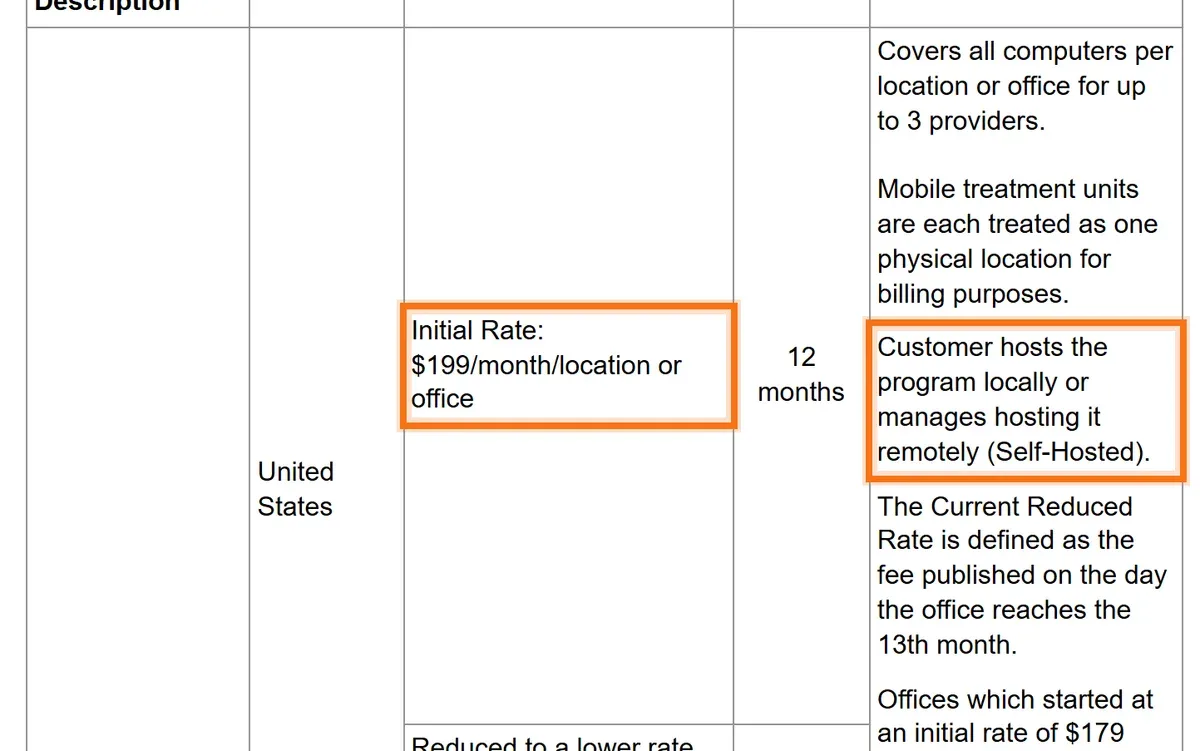
| Practice management software and its support | The software vendor | Per location or per provider, monthly. Open Dental, for example, publishes $199 per month per location as its initial rate, covering all computers at that location for up to three providers |
| Microsoft 365 or Google Workspace | Microsoft or Google, directly or through the IT company | Per user, per month, at the vendor's price |
| Computers, server, firewall, switches | The hardware supplier | Per item, when bought or replaced |
| Cabling and IT room for a new or renovated office | The IT or cabling company | A flat project price, based on the number of drops |
| Phones | The phone provider | Per line or per user, monthly |
What this means for your budget: the IT support fee is one line of five. Add the software vendor's fee, the email licenses and a yearly amount for replacing computers, and you have the real monthly cost of running the practice's technology. The Open Dental figure comes from the vendor's own published fee page and can change; Dentrix and Eaglesoft quote their own fees, so ask your vendor for the current number.
Notice the second highlight in the screenshot: with a self-hosted system, the vendor supports the program, and the practice is responsible for the server it runs on. That server, its backups and the network between it and the chairs are exactly what the IT fee pays for.
Hardware is the line practices forget. Open Dental no longer supports Windows 10, and the other vendors set their own requirements, so an operatory computer that still works can become a computer the software vendor will not help with. Replacing a few machines every year keeps that line steady; what to do with office computers still on Windows 10 covers the choices.
What makes a dental IT quote higher or lower?
Six things move the number most:
- Operatories and computers. The largest factor. More chairs means more workstations, more sensors and more cable runs to keep working.
- Server or cloud. A practice with its database and images on a server in the office needs that server patched, backed up and replaced on a schedule. A cloud system moves part of that work to the vendor, and part of the cost to the vendor's bill.
- Imaging. Sensors, a panoramic unit or a cone beam scanner add drivers, bridges and very large files. Images are also the part of the backup that grows fastest.
- The number of locations. A second office adds a second network and a link between the two. IT for multi-location dental groups in DFW explains how I keep both sites the same so a fix at one works at the other.
- What HIPAA requires that is not in place yet. Encryption, individual sign-ins, multi-factor sign-in and documented backups take more work at the start if the office has run on one shared front-desk password for years. The list is in HIPAA-compliant IT for dental offices.
- The state of the network on day one. Operatory computers on Wi-Fi, a consumer router and unlabeled cable need a cleanup first. I quote that as a one-time project so it does not inflate the monthly fee for good.
None of these is a reason to pay more than you should. They are the questions a careful provider asks before giving a number. A quote that arrives without anyone asking how many operatories you have is a guess.
Is hourly IT support cheaper for a small dental office?
For a small, stable practice, sometimes yes. If the office has two or three operatories, newer computers and a problem a few times a year, paying by the hour can cost less than a monthly plan. My hourly break/fix rates are published, with a one-hour minimum, billed by the hour:
| A typical call | Rate that applies | What it costs |
|---|---|---|
| Front desk computer cannot print, fixed remotely in under an hour, on a weekday morning | $100 per hour remote, business hours | $100 |
| Operatory computer will not start, two hours onsite on a weekday | $150 per hour onsite, business hours | $300 |
| Server problem on a Saturday, two hours remote | $150 per hour remote, after hours | $300 |
| Network down before a Monday schedule, two hours onsite on Sunday evening | $225 per hour onsite, after hours | $450 |
How to read this table: the right column is the rate multiplied by the hours, nothing else. Business hours are Monday to Friday, 8 AM to 5 PM Central; evenings, weekends and holidays are after hours. The examples are illustrations of the arithmetic, not a promise of how long any repair takes.
Hourly stops being the cheaper choice when nobody is applying updates or checking the backup between calls, when the practice grows past a handful of computers, or when the calls become monthly. A dental office also carries a risk most small offices do not: patient records. A practice that only calls when something breaks has nobody responsible for the safeguards in between. Hourly vs monthly IT support works through the break-even point.
What does it cost a dental practice to get IT wrong?
More than the monthly fee, and the costs are easy to name without inventing statistics:
- Chair time. When the schedule or the charts will not open, patients are sitting in chairs that are not producing. Every hour of that is lost production the practice does not get back.
- Retakes and delays. An image that fails to save, or a sensor that stops working after an update, backs up the whole day.
- Lost records. A backup that was never tested is found out on the day it is needed. Rebuilding charts and images by hand, where it is possible at all, takes weeks.
- A breach. A stolen unencrypted laptop or a hacked mailbox with patient information means notifying patients and regulators, and answering for which safeguards were in place.
- Emergency rates. Whoever can come fastest on a bad morning charges after-hours prices and has never seen the office before.
Almost all of it is prevented by routine work: updates outside patient hours, cabled connections to every chair, backups that someone restores on purpose, and individual sign-ins. If the network is already dropping at chair-side, why your dental office network keeps going down lists the usual physical causes.
What does IT cost when you open or renovate a dental office?
A new practice has a one-time bill before the monthly one starts. It has three parts, and each is quoted separately:
- Cabling and the IT room. Cat6 from the IT room to every operatory, the front desk, the consult room, sterilization and imaging rooms, each run terminated and tested, plus the rack, patch panel, switch, firewall and access points. I quote this as a flat project from the floor plan and the drop count. The scope is on the data cabling page.
- Equipment. Workstations, the server if the practice management system needs one, monitors, printers and the network hardware, quoted per item.
- Setup. Installing the computers, the practice management and imaging software with the vendors, email, phones and Wi-Fi, so the office opens with everything working.
Two things keep this bill down. Order the internet early, because carriers in Dallas can take weeks to reach a new suite, and a rushed temporary connection costs extra. And cable every chair now, including spare drops where a chair may go later; opening a finished wall afterward costs far more than the cable would have. The order of work is in opening a dental practice in Dallas: IT, cabling and network setup.
How do I compare dental IT quotes from different companies?
Ask every provider the same questions, in writing, and line the answers up:
| Ask | Why it matters in a dental office |
|---|---|
| Is the price per user or per device, and are the server and operatory computers counted? | A dental office has more computers than people, so the counting method can change the total |
| Do you support my practice management and imaging software, or only the computers? | Sensor drivers and imaging bridges are where a general IT company loses days |
| Are the images in the backup, and when was a restore last tested? | The database without the X-rays is half a patient record |
| Are onsite visits included? | A dead operatory computer cannot be fixed over the phone |
| When do updates run? | An update in the middle of the schedule stops a chair |
| How long is the contract, and what does leaving cost? | Month to month keeps the provider earning the work |
| Who will I actually talk to? | The office manager should not explain the imaging setup to a new person on every call |
What this means for you: two quotes with the same monthly number can cover very different work, and these seven answers show which one is cheaper once something breaks. How to compare IT support quotes has a fuller checklist for any small business.
Why practices in Dallas choose Cross River Tech, and how to get a number
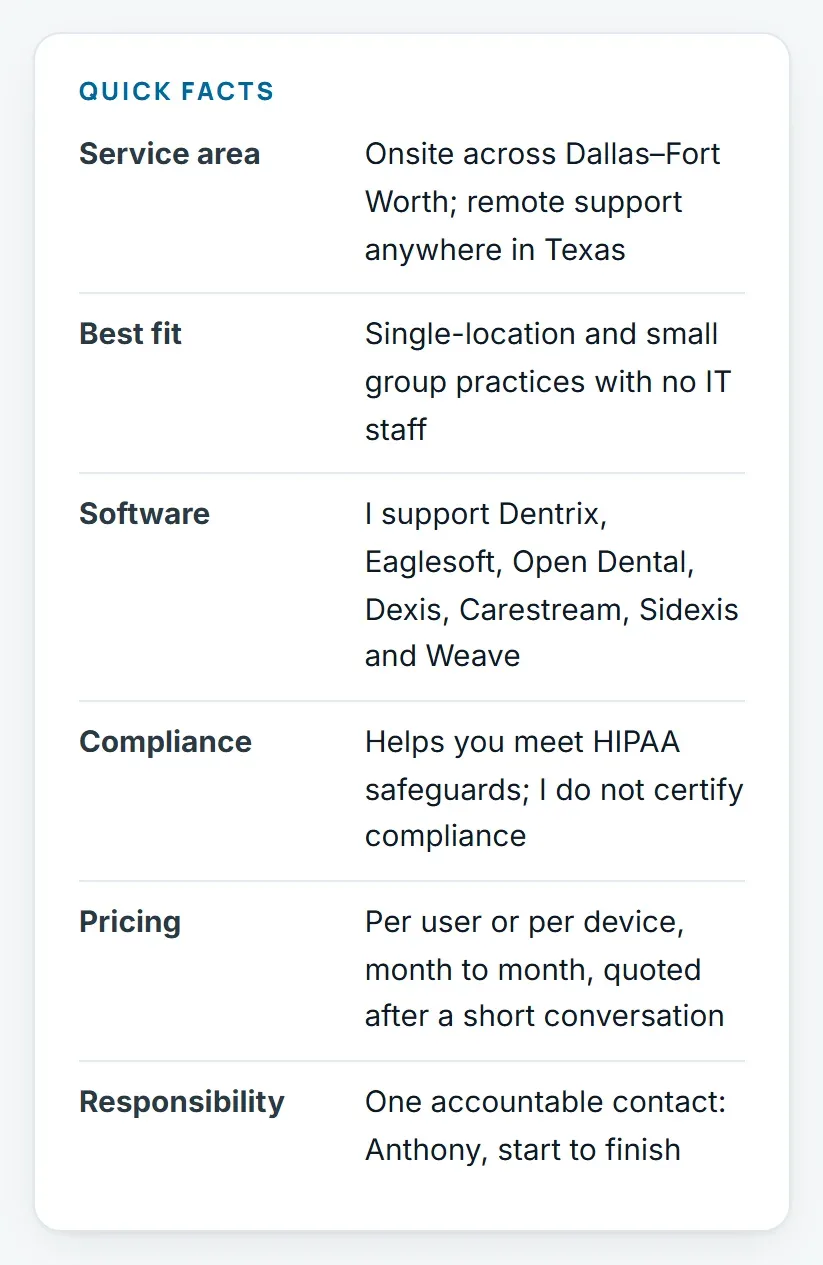
Cross River Tech is a small, owner-led IT company in Dallas, and you deal with me directly. I answer, plan the work and come onsite myself, while my team handles the routine monitoring and updates behind me. I support Dentrix, Eaglesoft, Open Dental and the imaging systems that feed them. The agreement is month to month and you can cancel anytime. I put the safeguards in place that help a practice meet HIPAA requirements, and I say plainly that the compliance decision stays with the practice.
I am also honest about fit. A single-location or small group practice with no IT person of its own is where I do my best work. A large group with dozens of locations and its own IT department needs a different kind of provider, and I will say so.
To get a real number, tell me four things: how many operatories and computers you have, which practice management and imaging software you run, whether there is a server in the office, and what has been breaking. I come back with a monthly figure, the list of what I would fix first, and what is billed separately. I work onsite across Dallas–Fort Worth by appointment and remotely anywhere in Texas. Contact me or call (214) 612-7080; the published rates are on the pricing page.
Questions people ask
How much does IT support cost for a dental office in Dallas?
Most IT companies quote a dental office per user or per device per month. Across the Dallas market, small business managed IT is commonly around $100 to $175 per user per month, a typical range rather than any one company's price. Software vendor fees, licenses, hardware and build-out cabling are billed separately. Cross River Tech quotes each practice after a short conversation, month to month.
What should a dental practice budget for IT each month?
Start with the support fee: at the typical Dallas market range of about $100 to $175 per user, a ten-person practice would see roughly $1,000 to $1,750 a month. Then add the practice management vendor's own fee, Microsoft 365 or Google Workspace licenses per user, the phone bill, and a yearly amount for replacing a few computers. Together those lines are the real monthly technology cost.
Is per-user or per-device pricing better for a dental office?
It depends on the ratio of computers to people. Dental offices usually have more computers than staff, because every operatory has one, so per-user pricing is often simpler and can be cheaper. A practice with part-time hygienists and few shared machines may do better per device. Ask each provider what is counted, including the server and imaging workstations, before comparing.
Is Dentrix, Eaglesoft or Open Dental support included in IT support?
The software vendor's own support plan is a separate fee paid to the vendor. IT support covers the parts the vendor does not: the server, database backups, the workstation at each chair, sensor drivers, imaging bridges and the network between them. Cross River Tech also works with the vendor on the practice's behalf when a problem is inside their product.
Can a small dental office use hourly IT support instead of a monthly plan?
Yes. Cross River Tech offers hourly help with no contract: $100 per hour remote and $150 onsite during business hours, $150 remote and $225 onsite after hours, with a one-hour minimum. It suits a small, stable practice. Once updates, backup checks and HIPAA safeguards need someone responsible every month, a managed plan usually costs less than the problems it prevents.
Are onsite visits extra on a monthly plan?
Not with Cross River Tech. On a managed plan, onsite visits come at no extra charge when remote support cannot fix the problem. Practices on hourly help pay the onsite rate, $150 an hour during business hours and $225 after hours, with a one-hour minimum. When comparing quotes, check whether another provider's plan is remote only.
Does the IT fee include making the practice HIPAA compliant?
No IT company can make a practice compliant on its own. The monthly service includes the technical safeguards that help a practice meet HIPAA requirements: encryption, multi-factor sign-in, individual accounts, tested backups, email security and endpoint protection, each one documented. The risk analysis and the compliance decision stay with the practice.
Do you support dental offices outside Dallas?
Yes. I support dental practices across the Dallas–Fort Worth area onsite by appointment, including suburbs such as Plano, Frisco, Richardson and Lewisville, and remotely anywhere in Texas. Practices outside Texas that need regular onsite visits are not a fit, and I say so up front.
Sources and further reading
Market price ranges in this article are my own observation of quotes in the Dallas market, not a published survey. Where I state a rule or a standard, the source is linked above.