How much does IT support cost for a medical office in Dallas?
Managed IT for a Dallas medical office is quoted per user or per device per month. Across the Dallas market that is commonly around $100 to $175 per user, a typical range and not my price list. I am Anthony Omini of Cross River Tech: I quote each practice after a short conversation, month to month, and hourly help with no contract is $100 remote or $150 onsite.
Answered by Anthony Omini, Cross River Tech, Dallas
Key takeaways
- Managed IT for a medical office is quoted per user or per device per month; in the Dallas market that is commonly around $100 to $175 per user, a typical range and not my price list.
- Exam-room computers, nurse stations and check-in tablets mean a clinic usually has more devices than people, so settle what is being counted before you compare two quotes.
- The EHR subscription, Microsoft 365 licenses, e-fax, e-prescribing tokens, phones and new hardware are separate bills with any IT company; budget them next to the support fee.
- A cloud EHR moves the server off your bill but not your duties: email, scanned documents, workstations and the HIPAA risk analysis are still the practice's job.
- Hourly help costs $100 per hour remote and $150 onsite during business hours and fits a very small, stable office; once records need someone watching every month, a plan usually costs less.
What does IT support cost for a medical office in Dallas?
On a monthly plan, a Dallas medical office pays a price per user or per device. Across the Dallas market, small business managed IT is commonly quoted somewhere around $100 to $175 per user per month. That is a typical market range, not my price list. The other way to buy help is by the hour with no contract: my published rates are $100 per hour remote and $150 per hour onsite during business hours.
I am Anthony Omini, the owner of Cross River Tech in Dallas, and I provide medical office IT support for small practices and clinics across Dallas–Fort Worth. I quote each practice after a short conversation, because the same headcount can be two very different jobs. A family practice on a cloud EHR is lighter work than a specialty clinic with a server in the back, an X-ray room and two locations.
Here is the market range turned into monthly figures for a few practice sizes. These are sums on the typical range, not quotes from me:
Monthly support at the typical Dallas market range
| People in the practice | Typical example | Monthly at $100 to $175 per user |
|---|---|---|
| 5 people | One physician, a nurse or MA, front desk, office manager | About $500 to $875 |
| 12 people | Three providers with nurses, front desk and billing | About $1,200 to $2,100 |
| 20 people | A busy specialty or multi-provider clinic | About $2,000 to $3,500 |
How to read this table: the support fee grows in a straight line with the count, so the count is the first thing to settle. For the same arithmetic across all kinds of businesses, see how much managed IT services cost in Dallas.
Per user or per device: how to count a medical office
In an ordinary office, each person has one computer and the two counting methods come out close. A clinic is different. Every exam room has its own workstation that several people share during the day, the nurse station has one or two, providers often carry a laptop, and the waiting room may have check-in tablets. Count the screens, not the staff, and a medical office almost always has more devices than people.
People versus devices in three example practices
| Example practice | People who sign in | Devices to support |
|---|---|---|
| One physician, two exam rooms | 5 | About 7: two front desk PCs, two exam-room PCs, a nurse station PC, a provider laptop, a check-in tablet |
| Family practice, six exam rooms | 12 | About 18: three front desk PCs, six exam-room PCs, two nurse station PCs, provider laptops, billing and office manager PCs, check-in tablets |
| Specialty clinic with an X-ray room | 20 | About 30, plus a server or imaging workstation and the equipment PC attached to the X-ray unit |
How to read this table: these are illustrations, so count your own rooms. On a per-user quote, the shared exam-room computers ride along with the people who use them; on a per-device quote, each one is a line on the bill, and so is the server.
Per-device pricing can still come out lower for a practice with several part-time people who share few machines. Ask each provider what is counted, whether tablets, the server and equipment PCs are included, and how a part-time provider who comes in two days a week is treated. I price either way and tell you which comes out lower for your clinic; the general comparison is in per-user vs per-device IT pricing.
What should the monthly fee cover in a medical office?
A monthly number is only worth comparing when the quotes cover the same work. For a medical practice, my managed IT services include:
- Every computer the clinic runs on, including exam-room, nurse station and lab workstations, with Windows and application updates scheduled outside patient hours so a restart never stops a visit
- The EHR at the IT level, cloud or on-premises: the workstations, browsers, network, internet and server it depends on, working with the EHR vendor when the problem is inside their product
- The front desk kit: card and document scanners, signature pads, label and wristband printers, and check-in tablets, which are the devices that break after updates
- Unlimited remote support for providers, nurses, medical assistants and the front desk, and onsite visits at no extra charge when remote cannot fix it
- Managed backup of the server, email and scanned documents, encrypted, kept onsite and offsite, with restores tested on a schedule
- Security: endpoint protection on every computer, email filtering, encrypted email for patient information and multi-factor sign-in
- The network: firewall, switches, Wi-Fi with patient Wi-Fi kept apart from clinical devices, printers and the internet provider, managed and monitored
- Documentation: a technical inventory and findings the practice can use in its HIPAA risk analysis
Lab interfaces, e-prescribing sign-in and a fax workflow that feeds the chart all depend on the computers and network working the way the vendor expects. When something in that chain breaks, the practice needs one contact who finds the failed link instead of three vendors pointing at each other.
Cloud EHR or a server in the closet: how it changes the bill
Where the electronic health record lives is the biggest single factor inside the per-user range after the count itself.
A cloud EHR takes the database server off your premises and off the IT bill. The vendor runs the platform, patches it and backs it up. It does not back up your email or scanned documents saved outside the chart, and it does not keep your internet, Wi-Fi and exam-room computers fast enough that the EHR feels quick. A clinic on a cloud EHR depends on its internet line, so I usually recommend a backup connection from a second carrier, billed by that carrier.
An on-premises EHR or practice management system puts the most important machine in the building in your server closet. It needs monitoring, patching on a schedule the vendor approves, backups that include the database and the images, restore tests, a battery backup for Dallas storm season and a replacement plan. That is more work every month and a hardware purchase every few years, so it sits higher in the range.
Imaging only matters where the practice has it: orthopedics, urgent care, podiatry, some primary care offices with an X-ray room. The equipment vendor supports the unit; the IT job is the acquisition computer, the network to the viewing stations and the storage. A practice with no imaging should not pay for imaging support in a quote.
If you are still choosing between cloud and server for a new location, opening a medical clinic in Dallas: the IT setup checklist covers that decision in the order the build-out needs it.
What HIPAA adds to the cost, and what the IT fee does not cover
HIPAA does not come with a price tag of its own, but it shapes what a responsible quote must include. The HIPAA Security Rule asks every practice to do a risk analysis: look at where patient information lives, what could go wrong, and what safeguards are in place. HHS publishes a free Security Risk Assessment tool for small practices. The decisions belong to the practice; my part is the technical inventory, the findings and the safeguards.
Three parts of HIPAA show up directly in an IT budget:
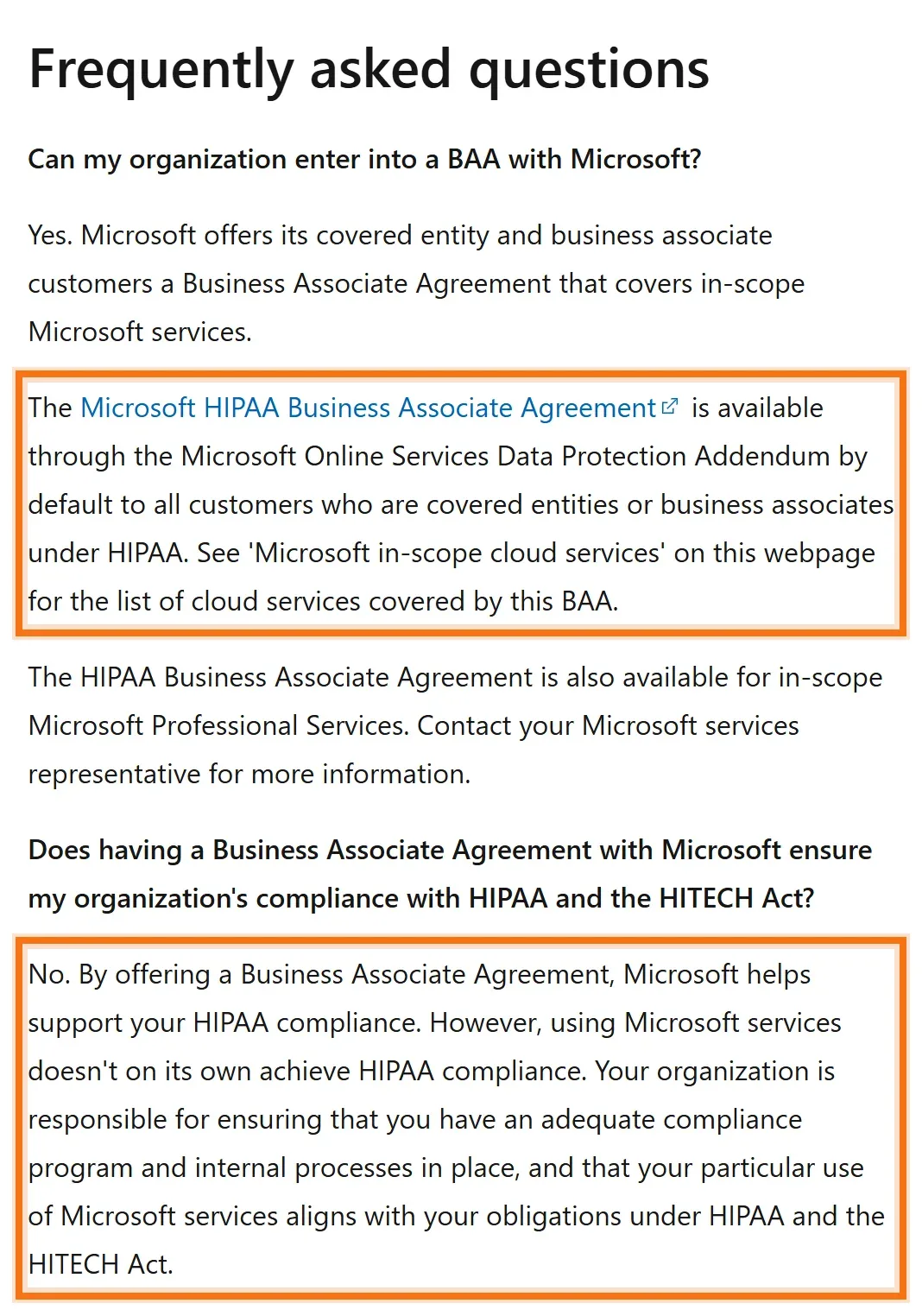
- Business associate agreements. Any IT company that can reach patient data should sign a BAA with the practice, and I do. So should the cloud services that hold patient data. The screenshot below shows Microsoft's own wording: the Microsoft 365 BAA comes by default to healthcare customers on its business services, and it does not make a practice compliant by itself. Google Workspace offers its own BAA that an administrator accepts. Consumer email accounts are not the place for patient information.
- The safeguards themselves. Full-disk encryption on every computer, individual accounts instead of one shared front desk login, multi-factor sign-in, automatic screen lock in exam rooms, encrypted email and tested backups. If those are missing on day one, closing the gap is a one-time project, quoted separately, so it does not inflate the monthly fee for good.
- Licensing that supports them. Some of these controls need a higher Microsoft 365 business plan than the cheapest one. That is a license decision, paid to Microsoft, and a fair quote says which plan it assumes.
No IT company can declare a practice compliant. What I do, and what to expect from any IT consultant on this, is in HIPAA IT compliance help for Dallas medical practices. The safeguards are part of my cybersecurity, backup and disaster recovery work.
What is billed on top of the monthly IT fee?
The support fee is one line of the practice's technology budget. These are separate bills with any IT company, and a fair quote lists them so the monthly number holds up.
Bills that sit next to IT support in a medical office
| Bill | Who you pay | How it is usually priced |
|---|---|---|
| EHR and practice management subscription | The EHR vendor | Per provider or per user, monthly, often with a setup fee and separate billing or clearinghouse charges |
| Microsoft 365 or Google Workspace | Microsoft or Google, directly or through the IT company | Per user, per month, at the vendor's price for the plan chosen |
| E-prescribing of controlled substances | The e-prescribing or EHR vendor | Usually per prescriber: identity proofing and a two-factor token or phone app the DEA rules require |
| Fax | A cloud fax provider or the phone company | A monthly plan with page limits, or an analog line for an old fax machine |
| Phones | The phone provider | Per line or per user, monthly |
| Internet, and a backup line | The carriers | Monthly per connection |
| Computers, tablets, server, firewall | The hardware supplier | Per item, when bought or replaced |
| Cabling for a new or renovated clinic | The IT or cabling company | A flat project price based on the number of drops |
What this means for your budget: add the EHR, the licenses, fax, phones and internet to the support fee, then set aside a yearly amount for replacing a few computers. That total is the real monthly cost of running the clinic's technology. Vendor prices change, so take them from each vendor's current quote.
For a new suite, cabling and the IT room are quoted from the floor plan; the scope is on the data cabling page.
Is hourly IT support cheaper for a small medical practice?
For a very small, stable office, it can be. A single-physician office on a cloud EHR with new computers and a problem every few months may spend less paying by the hour. My hourly break/fix rates are published, with a one-hour minimum, billed by the hour:
What typical calls cost at the published hourly rates
| A typical call | Rate that applies | What it costs |
|---|---|---|
| Label printer at the front desk stopped after an update, fixed remotely in under an hour on a weekday | $100 per hour remote, business hours | $100 |
| Exam-room computer will not start, two hours onsite on a weekday | $150 per hour onsite, business hours | $300 |
| EHR server will not come back after a power cut, two hours remote on a Saturday | $150 per hour remote, after hours | $300 |
| Network down before a Monday clinic, two hours onsite on Sunday evening | $225 per hour onsite, after hours | $450 |
How to read this table: the right column is the rate multiplied by the hours, nothing else. Business hours are Monday to Friday, 8 AM to 5 PM Central; evenings, weekends and holidays are after hours. The hours are examples of the arithmetic, not a promise of how long any repair takes. The full rate card is on the pricing page.
Hourly stops being the cheaper choice for a medical office sooner than for most businesses: between calls, nobody is paid to apply updates, watch the backups, keep the safeguards in place or hold the documentation the risk analysis needs. Hourly vs monthly IT support works through the break-even point.
What a cheap medical IT quote usually leaves out
When one quote is far below the others, the difference is rarely efficiency. In medical offices, it is usually one of these:
- Onsite visits are extra. The plan is remote only, and the exam-room computer that will not boot is billed by the hour on top.
- Only some devices are counted. Check-in tablets, the server, the X-ray acquisition PC or the nurse station computers are outside the quote and supported "as needed".
- Backups exist but nobody restores them. A backup that was never tested is found out on the morning it is needed.
- Scanned documents and email are not backed up because "the EHR is in the cloud".
- "That is the vendor's problem." EHR slowness, e-prescribing sign-in failures and lab results that stop arriving get bounced to the vendor, who bounces them back.
- No BAA, or a vague one. A provider who will not sign a business associate agreement should not have access to patient data.
- A long contract. A low monthly number locked in for years is not cheap if the service is not good.
The cost of a gap shows up as exam rooms that cannot open a chart, patients waiting and an after-hours call to whoever can come fastest. The same pattern applies to dental offices, and what dental IT support costs in Dallas shows how it looks with operatories and sensors instead of exam rooms.
How do I compare medical IT quotes in Dallas?
Ask every provider the same questions in writing and put the answers side by side:
Questions that make two medical IT quotes comparable
| Ask | Why it matters in a medical office |
|---|---|
| Is the price per user or per device, and are exam-room PCs, tablets and the server counted? | A clinic has more devices than people, so the counting method can change the total |
| Will you sign a business associate agreement? | An IT company that can reach patient data should, without being pushed |
| Do you support my EHR at the IT level and work with the vendor? | Slow charts and failed e-prescribing sign-ins sit between the vendor and the network |
| What is backed up besides the EHR, and when was a restore last tested? | Email and scanned documents are records too |
| Are onsite visits included? | A dead exam-room computer cannot be fixed over the phone |
| When do updates and restarts run? | Never during clinic hours |
| Which Microsoft 365 or Google Workspace plan does the quote assume? | Some safeguards need a higher license tier, billed on top |
| How long is the contract, and who will I actually talk to? | Month to month keeps the provider earning the work; one contact means you never explain the clinic twice |
What this means for you: two quotes with the same monthly number can cover very different work, and these eight answers show which one is cheaper the first time something breaks. How to compare IT support quotes has a fuller checklist for any small business, and Microsoft 365 security for small business covers the settings behind the license question.
Why Dallas practices choose Cross River Tech, and how to get a number
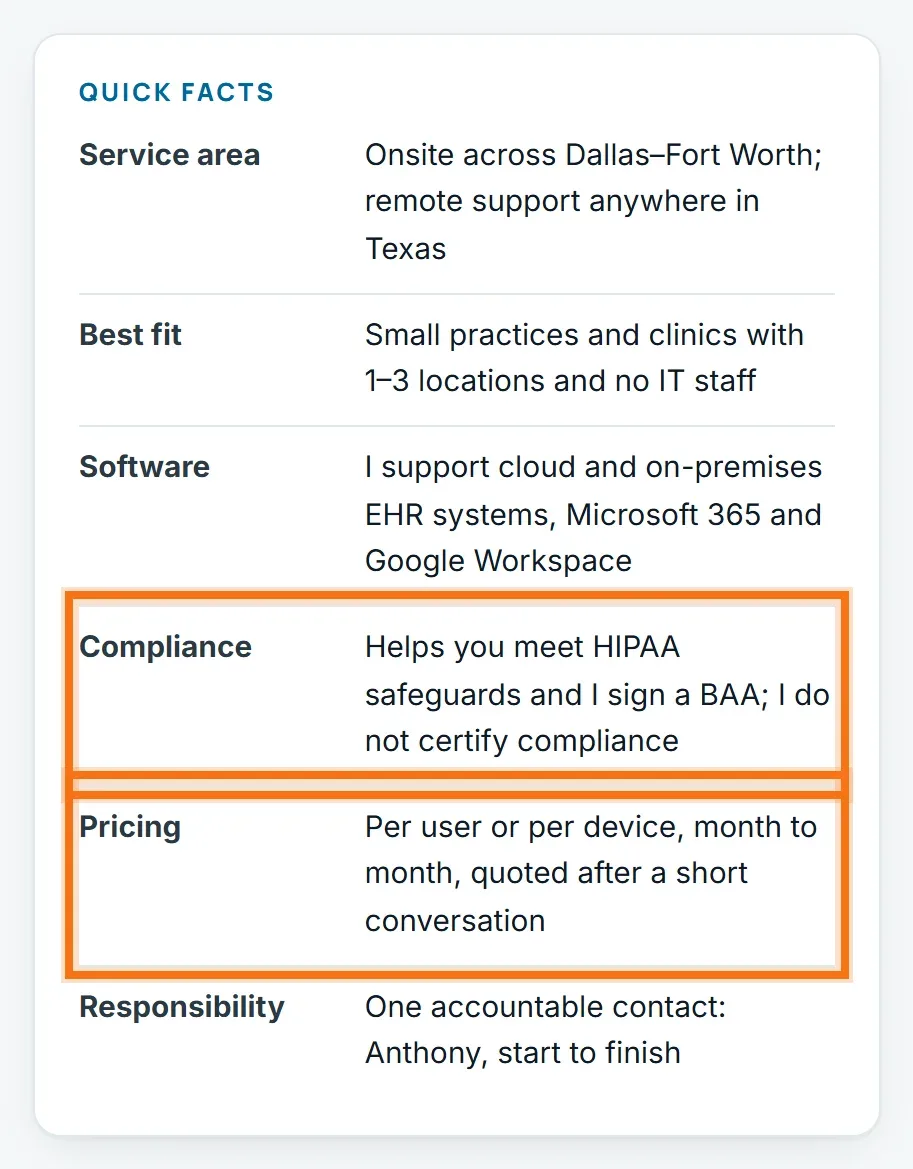
Cross River Tech is a small, owner-led IT company in Dallas, and you deal with me directly. I answer, plan the work and come onsite myself, while my team handles the routine monitoring and updates behind me. I support cloud and on-premises EHR systems at the IT level, sign a business associate agreement, and put the safeguards in place that help a practice meet HIPAA requirements, while saying plainly that the compliance decision stays with the practice. The agreement is month to month and you can cancel anytime.
I am also honest about fit. Small practices and clinics with one to three locations and no IT staff of their own are where I do my best work. A hospital or a large group with its own IT department needs a different kind of provider, and I will say so.
To get a real number, tell me five things: how many people work in the practice, how many exam rooms and other computers you have, which EHR you run and whether it is cloud or on a server, whether there is imaging, and what has been going wrong. I come back with a monthly figure, the list of what I would fix first, and what is billed separately. I work onsite across Dallas–Fort Worth by appointment and remotely anywhere in Texas. Book a call or ask for a quote, or call (214) 612-7080.
Questions people ask
How much does IT support cost for a medical office in Dallas?
Most IT companies quote a medical office per user or per device per month. Across the Dallas market, small business managed IT is commonly around $100 to $175 per user per month, a typical range rather than any one company's price. The EHR subscription, licenses, fax, phones and hardware are billed separately. Cross River Tech quotes each practice after a short conversation, month to month.
What should a medical practice budget for IT support each month?
Start with the support fee: at the typical Dallas market range of about $100 to $175 per user, a twelve-person practice would see roughly $1,200 to $2,100 a month. Then add the EHR vendor's subscription, Microsoft 365 or Google Workspace licenses, fax, phones and internet, and a yearly amount for replacing a few computers. Together those lines are the real monthly technology cost.
Is per-user or per-device pricing better for a medical office?
It depends on how many shared devices the clinic has. Medical offices usually have more devices than people, because every exam room and nurse station has a computer and the front desk may use check-in tablets, so per-user pricing is often simpler. A practice with several part-time staff sharing few machines may do better per device. Ask what is counted before comparing.
Does a cloud EHR make IT support cheaper?
Usually somewhat, because there is no database server in the office to patch, back up and replace. It does not remove the rest: exam-room computers, the network, a reliable internet line with a backup, email, scanned documents and security still need someone responsible. The practice also still owns its HIPAA risk analysis, whatever the EHR vendor does.
Will my IT company sign a business associate agreement?
It should. Any IT provider that can reach patient data is a business associate under HIPAA and should sign a BAA with the practice. Cross River Tech signs one. Cloud services that hold patient data need their own: Microsoft offers its HIPAA BAA by default to healthcare customers on its business services, and Google Workspace has one an administrator accepts.
Is e-prescribing of controlled substances part of IT support?
The e-prescribing setup itself, including identity proofing and the two-factor token or phone app that DEA rules require, comes through the EHR or e-prescribing vendor and is billed by them. The IT side is making sure the workstations, browsers, phones and network let prescribers sign in without trouble, and working with the vendor when a sign-in keeps failing.
Can a small medical practice use hourly IT support instead of a monthly plan?
Yes. Cross River Tech offers hourly help with no contract: $100 per hour remote and $150 onsite during business hours, $150 remote and $225 onsite after hours, with a one-hour minimum. It suits a very small, stable office. Once updates, backup checks and HIPAA safeguards need someone responsible every month, a managed plan usually costs less than the problems it prevents.
Sources and further reading
Market price ranges in this article are my own observation of quotes in the Dallas market, not a published survey. Where I state a rule or a standard, the source is linked above.